
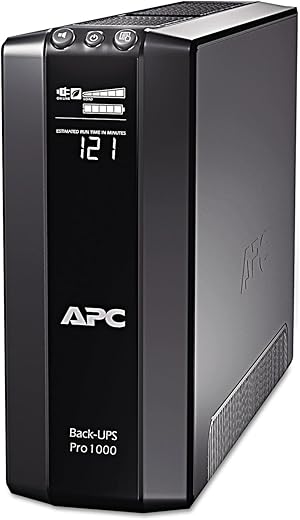

APC Back-UPS Pro BR1000G-IN, 1000VA / 600W, 230V UPS System, High-Performance Premium Power Backup & Protection for Home Office, Desktop PC, Gaming…
₹12,839.00
- Line Interactive UPS with Load Capacity of 600Watts / 1000VA
- LCD Display and Sleek Design
- 6 nos. India 3 Pin 6A Output Socket – 4 with Battery backup & 2 with Surge protection Outlets
- Automatic Voltage Regulator (AVR) with Wide Input Voltage Range of 170-294V
- 45-60* min. Back-Up time *as per the load. Typical recharge time 7.4hour(s). Expected Battery Life (years) 2 – 4
- Green UPS with Programmable Outlets with energy-saving features
- Generator Compatible. Cold start capability allows the load to power on just on battery
- Stays quiet during a changeover from mains to generator. USB, Serial Interface compatible with Powerchute UPS Management Software
- 2 Years of Warranty
,
Specification: APC Back-UPS Pro BR1000G-IN, 1000VA / 600W, 230V UPS System, High-Performance Premium Power Backup & Protection for Home Office, Desktop PC, Gaming…
|
10 reviews for APC Back-UPS Pro BR1000G-IN, 1000VA / 600W, 230V UPS System, High-Performance Premium Power Backup & Protection for Home Office, Desktop PC, Gaming…
Show all
Most Helpful
Highest Rating
Lowest Rating
Add a review
Related Products


APC Back-UPS Pro BR1000G-IN, 1000VA / 600W, 230V UPS System, High-Performance Premium Power Backup & Protection for Home Office, Desktop PC, Gaming…
₹12,839.00

Bernardo –
I’m so far very impressed with the BR1000G, though I haven’t had a brownout at all I have tested its capabilities.
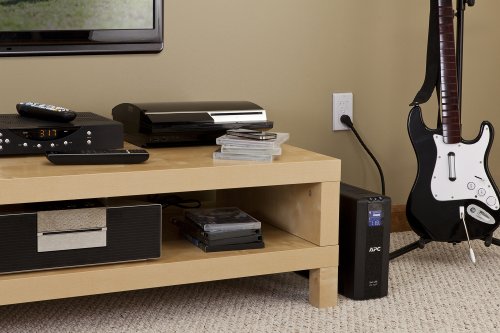
It’s quite an attractive unit, and it looks nice sitting next to my components.
Plugged into it, I have a Synology DS1815+, a Netgear Nighthawk AC1900 R7000 router, a Synology DS115J, a digital alarm clock and a cable modem. According to the LCD display, this represents 11% load, and can run all the devices for 68 minutes without power.
It seems like a sturdy and reliable power backup for a smaller setup, and as I said, I did test it and it works well.
ഹൈപ്നോ🐸ടോഡ് –
As soon as I got the product it worked fine. The next day I restarted the unit and it didnt turn on. I could only hear the irritating fan noise but the unit wont boot up at all. Amazon was very helpful but the deal had to be done with APC customer care in my city without which Amazon wont budge in. I had sleepless couple of weeks with dead APC UPC and irritating fan sound from my TV room. One day APC guy visited my home and agreed for a new unit. Got a new unit in a couple of days and since then I have no complaints.
Would recommend this product. Gives me backup of around an hour for my 55inch TV, Tata Sky and speakers.
akshay –
This summer I encountered several power outages at my home due to heavy thunderstorms passing through and decided I need a UPS for my computer. Among the Back-UPS PRO family I chose this model providing 1000VA/600W after weighing my power needs against the physical size and weight of the UPS. I run an iMac with a couple of external hard disks, having a total power consumption of about 180-200W in typical usage (web access or text editing). The UPS tells me it provides about 25-30 minutes runtime for this load which very well meets my goals. I mounted the UPS on a single-board shelf at the foot of my computer table – a laptop style table on casters which I had already heavily customized to hold hard disk and other accessories while hiding cables in the back. The shelf needed to be rather sturdy to hold the unit’s weight of 23 pounds. A pair of braced brackets and a wooden board from a hardware store were sufficient.
The shipping box contained the UPS, a USB cable to the computer, and a coax bridging cable, and no accompanying software, as several users noted. That said, add-on software is not needed on the Mac since Mac OS X has very good built-in support. Upon connecting the USB cable, the OS recognizes the UPS model and presents options relevant to UPS operation in the Energy Saver preference pane (under Lion, and I believe since Leopard). Sleep times and screen dimming can be customized specifically for the scenario of running under UPS power. A shutdown can be initiated based on one or more of three criteria: time having run on UPS, time remaining on UPS, or percentage charge remaining on the UPS. I chose the latter, with a conservative setting of 25%.
The model does not make any noise during regular use. On loss of input power, it starts to quietly hum a little from the internal power source. On push of a front panel button, the font panel display cycles through various characteristics such as voltages, power, and estimated runtime. Its back-light can be set such that it is turned off during normal operations and comes on for a minute after pushing one of the buttons. I wish the display were a little more data-rich to avoid the cycling. The buttons are a little mushy and wobbly but suitable for the expected infrequent use. There is a sufficiently loud beeper which can be muted. By default, it beeps after loss of input power. As others noted, the beep would be rather inconvenient at night, and the ability to switch it off is very welcome. On loss of input power the computer is notified and Mac OS immediately pops up a warning message. After reaching a configured threshold while on UPS power the computer is shut down in an orderly manner.
I had this unit for a couple of weeks now and I am very happy with it.
Prithvi –
Bought it after running up and down various etailers cause my research led me to the right ally. I have a requirement to save very costly equipments and ordinary UPS will not do its job. To cut my story short, this is what I have:
1. LED TV. 43 Inch.
2. Home Theatre. 5.1.2 channel.
3. Game console
4. A/V Receiver
In total they consumed close to 1000 V, but since all of them will not be in parallel the average usage will be around 400-500 V if 2 equipments are running in parallel.
Why APC UPS ?
This is a inline or online UPS. It steps up voltage when low input is received and provides surge protection when high input is encountered. It has LCD screen with various diagnostic features such as MTF (mean time to failure aka. total drain), Self tests, Average usage graph etc. I am absolutely scientific in thoughts (being a researcher) so features will matter to me only if they provide me real time data and with solid facts. I hate glossy features and unfounded facts which are only to impress novices. It provides excellent options in terms of number of sockets and the most important feature is that sockets are placed in various configurations (Surge protection only, Surge + UPS), Network cable sockets, Extra battery pack support, Firmware update feature (requires network to USB cable – provided) and software to monitor application. This is more than enough for a person to handle and keep a good hold on UPS health and features. Support system of APC is unmatched in this field.
So, this product had to be mine. My precious. 🙂
What do others say ?
1. Very noisy : YES. It should be. The product has mother board, battery and wires all beautifully packed into a gorgeous ABS plastic console which will work at high temperatures, dusty, humid conditions. To save internal components APC engineers have added a large brushless fan which will work only when operation temperature is exceeded. This fan also kicks in for few seconds when UPS is turned on, when UPS is providing backup, when ambient temperature exceeds set limit. The noise itself is not from fan, but when the force of air collides and deflects on the sills. Watch closely, you will understand how this works.
2. Tripping noise : This is for a reason. I am not saying this is a beauty feature of this product, but shouldnt you know when the UPS kicks in to keep you aware of voltage input ?
3. Heavy : At 12 Kilos, this is a solid product hard to negotiate with. If you are planning to keep it on wooden stands or support make sure it is strong. I mean really strong. Ideally should be placed behind your entertainment console or workstation so that you reduce possibility of kids meddling with this equipment or worst falling when pushed off balance. Do not place this item beyond half a foot from floor. BE VERY VERY CAREFUL. Plan and design right spot for this equipment.
4. Cost : Yes. Its seriously on the high end. Hard to justify, but I’m sure it comes with a premium cost due to build quality and product performance. Might be Achilles heel.
5. Not good with diesel genset or facility backup features : Not sure what parameters were used to check this. Some people reported that there is a distinct humming noise from sockets in the wall, but that needs socket investigation on the input line not the UPS itself. Better to use high amp sockets on the wall to be safe with thick wiring of good manufacturers.
Having said this, this writer is of opinion that given the options available to Indian entertainment console enthusiasts, backup and protection are crucial insurances. Going by wide support, low product failure rate and industrial product build quality a product as this is an blessing in disguise and a must for costly entertainment devices and consoles. Adding a voltage stabilizer to feed this monster will be adding honey on butter scotch ice cream.
nicole –
I bought this to deal with the blackouts I had been dealing with. After three power outages that abruptly turned off my gaming PC in the middle of usage, I needed to find a way to protect my PC from further power disruption so as not to break it.
This back-UPS is heavy but sturdy. It is not a plug and play machine. You actually need to physically pull out the battery and flip it over to insert the battery in the correct orientation. If you don’t do that, then it probably won’t work.
I didn’t install the software or in fact mess with any of the settings. Once I installed the battery correctly, I plugged in my PC tower and my double monitors. After some consideration, I plugged in my TV and PS4 as well because I had extra plugs. And I did use multiple extension cords to fit everything.
When my first power outage happened I didn’t even notice it happening. My computer didn’t flicker or react in any way. I was pleasantly surprised at how smooth the transition was from power to battery. Unfortunately, with my computer on, the display said it only had 10 minutes of power left even at full battery. Which is fine for what I needed–all I wanted was the chance to properly shut down my computer on my own terms in the event of a blackout. Once my computer was off, the display changed to around 100 minutes of power, and when I turned the TV on it changed to 60 minutes. The run time isn’t very long but the UPS was satisfactory for me in providing continuous power to protect my computer.
I haven’t used it very long so I can’t attest to its longevity.
As a side note I noticed when I first plugged everything in I faintly smelled burnt plastic. The smell lingered for a couple days but I didn’t see any issues with the device. After a while, the smell vanished. I’m not sure what it meant but in my personal experience it did not affect its ability to do its job.
Abhineet Srivastava –
Did not cover it as in manual. Did not switch off its power supply after use as in manual. Gave it space for air circulation and kept it in cool room with no high temperature.
After first powerup, I kept it for charging untill full charge and downloaded the powerchute software in my computer and connected to this ups. The software is useless if you are not going to connect this ups to computers and you can uninstall it.
This ups still working after one year of use for smart tv and the tv doesn’t shut downs like when you use cheap ups. No error, no issue till date. Even after reading negative reviews i took the risk and purchased this but my faith was rewarded by Schneider and APC. Thank you for good product.
Amz Buyer –
One of the worst after sales service experience. My product went faulty after 3 months of use and as part of repair they are offering 4 years refurbished item as a replacement. I even ask that you repair the part but to that also they say no. I mean this I was not expecting from a brand like APC. So be careful before you buy it.
M. Sternberg –
cambie a varias marcas, pero esta es la mejor, este modelo tiene varias opciones en pantalla que se ajustan a mis necesidades, muy contento
Proklaim –
Great packaging and quality. Easy to set up, and I love having my speakers and monitor turn off automatically, after a configurable delay, when I put my PC to sleep. The PC is also our family theatre/TV/homework station. 🙂
ഹൈപ്നോ🐸ടോഡ് –
I could understand why many are giving bad ratings when it comes to backup it provides. One pay 10k one do expect more. But my case is different.
My linux rig got fried taking most of my hardware, even my Seasonic PSU. My home inverter was on ups mode for 1 years it was fine until changing inverter to now defunct sukam brand. Cost of replacing pc parts was so high i decided to get a good UPS(no warranty will be available if parts are fried). My main requirement was it must be manageable in Linux distro’s.
The In build voltage meter and guaranteed protection promise sold me on this model.
I am just listing what i didn’t like.
🐸 UPS makes a small hissing noise when on battery apart from the fan sound.(not the normal beep a hissing noise usually heard in crappy inverter and ups)
🐸 Was expecting a surge protector for Wired Ethernet, only phone jack is there in Indian model.
🐸 Rubber foot would have been good as this move with little effort on my table.
Delivery horror – consistently worse courier.(it takes effort to be this bad)
Delivery process was a mess, Courier was delhi-very, they are worst in kochi, Even though this is amazon delivery fulfilled. It took a lot of time and stayed in the courier place for 4 days they only deliver after i complained to amazon(amazon support was awesome). And there were no protection for this. Just the box in which product comes in with little broken thermocol. How it reached undamaged is beyond my understanding. Box was also opened before – guessing this is a returned product.
This is just awesome in Linux. Linux recognize the battering. It knows when it charges, it knows battery levels, it know when to go to standby. Just awesome. I am always a happy customer when it just works in Linux.. Thank you APC for the unofficial but awesome Linux support.
____________________________________
UPDATES
____________________________________
⏳ Update after a week of use: – battery life is fine, just as they advertise.
⏳ Update after 2 weeks: – My ups is connected to inverter so that had to be changed as when power fault happiness and inverter can’t take the load of pc then UPS goes to F2 error mode.
⏳Battery went full drain after advertised backup time, even after battery charge was done the fan still spun loud for 24hours, this behavior can be controlled by acpd daemon in Linux, so it should be controlled in windows also I believe.
⏳2021-08-01 – Battery backup dropped suddenly from 30 mins to 2 mins and battery change notification on unit was shown. Battery replacement 2500k for batteries and 500 for technician onsite replacement. Booked via APC support email, battery changed within 3 days. Pretty good service and response. Professional
⏳2022-04-01 – Again battery problem, opened the unit and found replaced battery is not APC branded one. Gets 1 min of backup. Contacting and will update after fixing
⏳2023-10-18 – Replaced battery, Found out previous battery replacement was done bad as in wrong crappy battery and wrong capacity was used. New battery cost 4700 and this is also not apc battery it’s Exide and was done by APC service center. Online original battery cost 6700rs, Even I was willing to pay for original this service center forced me to go Exide battery. (Hopefully Exide I haven’t seen it or service center gave me any warranty card)