
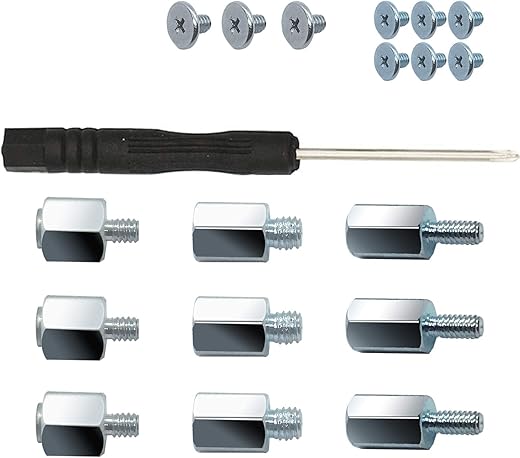



SGTKJSJS M.2 NVME SSD Mounting Screws, 18 Pieces, Suitable for ASUS, MSI, Gigabyte Motherboards & Laptops
₹963.00
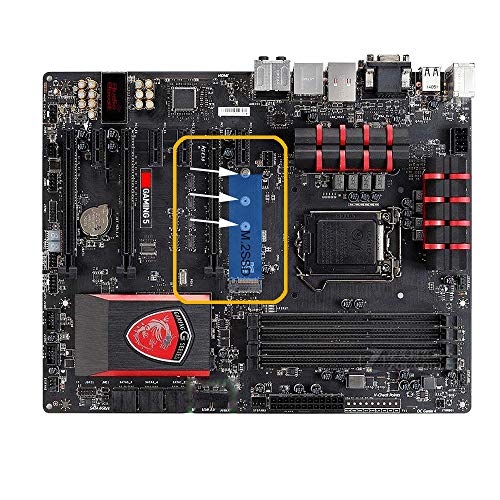
- ➤M. 2 NVME SSD mounting screws for ASUS、 msi、 Gigabyte motherboards
- ➤screws are suitable for M.2 SSD installation of laptops and adapter cards.
- ➤laptop M.2 2280 SSD screws
- ➤Package Content:Hex head jackscrews*9、Flat head Screws*9、Screwdriver*1
- ➤Application: Perfect for universally laptop notebook repair, applied in electronics, computers, PC board, DIY hobby etc.
,
Specification: SGTKJSJS M.2 NVME SSD Mounting Screws, 18 Pieces, Suitable for ASUS, MSI, Gigabyte Motherboards & Laptops
|
7 reviews for SGTKJSJS M.2 NVME SSD Mounting Screws, 18 Pieces, Suitable for ASUS, MSI, Gigabyte Motherboards & Laptops
Show all
Most Helpful
Highest Rating
Lowest Rating
Add a review
Related Products



SGTKJSJS M.2 NVME SSD Mounting Screws, 18 Pieces, Suitable for ASUS, MSI, Gigabyte Motherboards & Laptops
₹963.00

SheemOn Shapiro –
For whatever reasons, manufacturers of M.2 devices “forget” to include the stud and screw needed to install the device to the computer instrument it needs to be attached to.
Amazon sells several of these kits, in different configurations.
In my experience, this is the better of these kits.Depending on your hardware, there are several different size fasteners needed for the task. Some other kits give you enough hardware for one or two installations, but not necessarily the right sizes. This kit comes with three sets in three sizes. When installing the M.2 device, start wit the new M.2 safely in the package it was dispensed to you. Instead, find a little magnet, and spread all the pieces in the magnetic tray or over the dace of a magnet. Then, with a good light, a dose of patience, and perhaps a magnifying lens (as your age and health dictate). Find the area of your computer (Mother-Board) where the card is supposed to be mounted and study it a bit. A YouTube short presentation may help. This system is a bit unusual and it will not hurt to get acquainted with all the participants before the fin begins.
Next, install the heat-sink to the device, paying attention to pesky details.
(Assuming the <.2 device is to be mounted parallel to the MB), measure the length of the M.2. This will hel0p you decide which mounting hole to use. Almost without exception, you will need a stud; the M.2 needs to go over the mounting holes/bases pput there for the shorter sizes. Going over them without touching; the studs are metal, the bottom of the M.2 is full of signal traces, metal to metal contact means trouble, etc.
Install the stud in the appropriate hole. Finger tight is good enough, unless you have the proper tools.
Next, the M.2 card needs to be gently inserted into the special socket (about 30 degrees angle), and then gently
lowered onto the stud you just finger-tightened above.
Hold the M.2 down and start a screw into the stud. fasten the screw gently. No need to torque anything, jsut tight enough so normal handling will not loosen it.
Suggestion: Get yourself a tiny magnet. If it is small enough, attach it to the shaft of the tiny screwdriver that came with the kit. If not, try to rub the screwdriver with the magnet, a few times, but not back and forth. The goal is to make the screwdriver slightly magnetized. This way you will be able to pick up the screw with the screwdriver. Whatever you do, do NOT drop the screw or the stud into a crevice in the computer. If you do manage to do that, make absolutely sure you find the screw before you apply power to that computer.
None of this has anything to do with this kit, but it is information surprisingly many do not possess.
Sai –
These screws fit my Asus x570e Strix motherboard perfectly. I was a bit worried that these could be laptop specific but they fit my PC motherboard quite well. Screw and Sleeve quality is very good. Wish the bundled screw driver was magnetic. Gets a bit tedious with those small screws but was able to fit them without issues.
Julio Cesar Perez –
Me sirvió para mi laptop ASUS. Encaja sin problema. Gran compra sobretodo por la variedad del paquete.
S7 –
Great !! It comes with 3 different set of screws option and there’s one that fit nicely for my Gigabyte X570 Aorus Master NVME M.2 mainboard. Shipping using Amazon Prime is really fast.
S7 –
I was adding a solid state M2 drive to my computer, and I did not have the support post and screw to secure it. I found this on Amazon and ordered it. It was exactly what I needed. If you have never installed an NVME M2 drive, (flat memory chip that takes the place of your computer’s hard drive) it can be a little tricky. The NVME chip has a notch, and the spacer post grooves into the notch and a tiny screw holds the whole thing tight. Without those two pieces there is not practical way to secure NVME M2 in its slot. These were machined to perfection and was an easy install. Oh, and the kit includes 9 variable sized posts, 9 screws and a cheap little screwdriver. Good kit highly recommended.
Mark eMark –
Fit my Msi mobo
Sujay Mandal –
Better product and good quality but price is high