




NZXT Kraken 360 RGB 360mm CPU Liquid Cooler/AIO with with LCD Display and RGB Fans – White | Support Intel Socket : LGA 1700, 1200/115X | AMD…
₹19,980.00
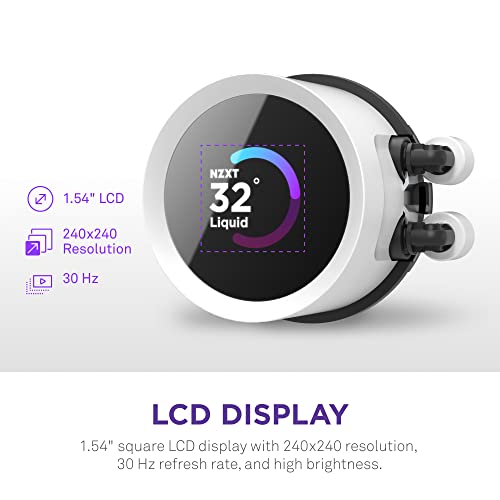
- Pump features an embedded 1.54” square LCD screen to display real-time system info or custom images * Adjustable screen orientation accommodates pump head position
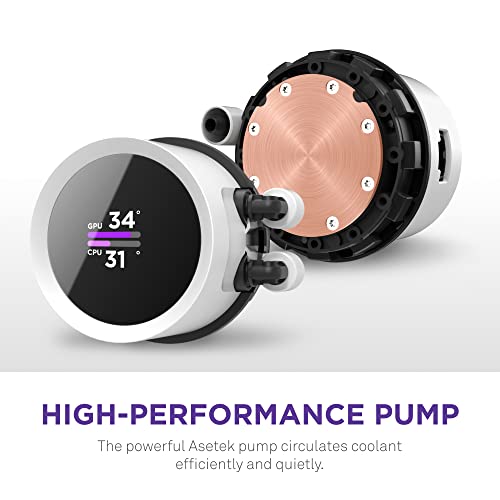
- Powerful Asetek pump provides optimal cooling and up to 2,800 RPM whisper-quiet operation
- Includes high-performance PWM fans with fluid dynamic bearings for optimal cooling
- Includes F140/F120 RGB Core fans
- Control custom screen content, RGB, pump speed, and zero-noise fan curves with NZXT CAM software.
,
Specification: NZXT Kraken 360 RGB 360mm CPU Liquid Cooler/AIO with with LCD Display and RGB Fans – White | Support Intel Socket : LGA 1700, 1200/115X | AMD…
|
9 reviews for NZXT Kraken 360 RGB 360mm CPU Liquid Cooler/AIO with with LCD Display and RGB Fans – White | Support Intel Socket : LGA 1700, 1200/115X | AMD…
Show all
Most Helpful
Highest Rating
Lowest Rating
Add a review
Related Products


NZXT Kraken 360 RGB 360mm CPU Liquid Cooler/AIO with with LCD Display and RGB Fans – White | Support Intel Socket : LGA 1700, 1200/115X | AMD…
₹19,980.00

DesiMan –
Good product does the work fine
TheXX7 –
Le NZXT Kraken 360 RGB est un refroidisseur liquide de processeur AIO (tout-en-un) qui offre une excellente performance tout en ajoutant un style unique à ton PC. Le radiateur de 360 mm et les trois ventilateurs F120 RVB assurent une circulation d’air optimale pour maintenir des températures basses, même lors de sessions de jeu intenses ou de montées en puissance. Ce qui le distingue, c’est son écran LCD personnalisable de 1,54″ qui te permet d’afficher des images ou des mesures de performance en temps réel. La pompe haute performance garantit une efficacité maximale. Un excellent choix pour les passionnés de hardware qui veulent allier puissance et esthétique dans leur setup !
pritam –
As someone who prioritizes both performance and aesthetics in a PC build, the NZXT Kraken 360 RGB has exceeded all my expectations. From unboxing to installation and performance, this cooler delivers a premium experience every step of the way.
Installation:
The installation process was surprisingly straightforward. The included instructions were clear, and all necessary mounting hardware was provided. NZXT has clearly put thought into making this cooler as user-friendly as possible, even for those building a PC for the first time. The flexible tubes were easy to route, and the unit fit perfectly in my mid-tower case.
Cooling Performance:
The cooling performance of the Kraken 360 RGB is nothing short of exceptional. I’ve paired it with a Ryzen 7 7800X3D, and even under heavy loads like gaming and video rendering, the CPU temperatures remained impressively low. Idle temperatures hover around 30°C, while intense workloads rarely push beyond 65°C. For an AIO cooler of this size, these results are outstanding.
RGB Customization:
Let’s talk about the showstopper—the RGB. The lighting on the fans and the infinity mirror pump cap is absolutely mesmerizing. Using NZXT’s CAM software, I was able to fully customize the RGB to sync with the rest of my setup. The effects are smooth, vibrant, and add an incredible visual element to my build. Whether you’re a fan of subtle glow or bold light shows, the Kraken 360 RGB offers endless possibilities.
Noise Levels:
One of the best features of this cooler is how quiet it runs. Even at higher fan speeds, the noise levels are barely noticeable. The fans are designed to prioritize airflow without creating unnecessary noise, making it perfect for those who want a quiet gaming or working environment.
Build Quality:
The Kraken 360 RGB feels robust and well-made. The materials used for the radiator, pump, and tubing all scream quality. NZXT’s reputation for durable products holds true here.
Final Thoughts:
The NZXT Kraken 360 RGB is an excellent choice for anyone looking to combine top-tier cooling performance with stunning RGB aesthetics. While it’s slightly more expensive than some competitors, the performance, features, and visual appeal more than justify the price. Whether you’re an experienced builder or a beginner, this cooler will elevate your PC setup in both performance and style.
DesiMan –
I liked the way NZXT redesigned the cable interface to the pump, cleared all the clutter but, I would still like to see min cables however, I am not much bothered about it. I like the pump head display unit, and the information you can display, very useful. I like the radiator & fans but, I still prefer thicker radiator. The tubes are redesigned and much better now, Gen 5 Asetek pump also comes with the display. I used this time the AIO for GPU cooling for RTX A4000, with amazing results.
Rajesh –
First seller send me old used cooler the amazon replace it with new one,
Con: pipe are small i was not able to install radiator pipe upside down position which is idle for air management inside radiator so I have to install it in not an ideal position
Pros: temps idle never goes beyond 35 on silent mode and on performance it goes less then 30 and on hardcore benchmark it goes 99 on some core because I am using 19-13900k but never reach thermal throttle
with this cooler you will never reach abobe 65 degree c (my room temp 25-30)
make sure you attach pump bracket like so that your pipe is on middle
pritam –
Got the NZXT Kraken 240 for my PC and it’s been a game-changer. Keeps my CPU cool even during heavy gaming sessions, and the little LCD screen is pretty neat for showing temps or custom images. The installation was straightforward, and it looks slick in my case. Would definitely recommend if you’re looking for solid cooling with a bit of flair. You can adjust the brightness of the lcd and it sounds pretty quiet so far. I was able to mount it easily but definitely mount the fans first before you fit it in. perfect fit.
Konark Jha –
Product is just awesome , no comparison with any other product BUT , Its dissapoints me when I noticed the display is not in full screen .
I mean WTF , it sucks the total looks of this . NZXT should remodify this .
Dante –
Lo ocupo con un Intel Core i9-13900KF y todo va en orden, en juegos y en edición de video y fotografía, nunca pasa de los 80C°. Llevo mas de un mes con el y sin ningún problema, lo recomiendo ampliamente.
Konark Jha –
I was originally running a stock air cooler for my Ryzen 5 7600 CPU. My temps were consistently high so I went for this liquid cooler. My temps went from 80C while gaming to 50C and below.
Tons of videos on how to setup and for someone who isn’t great with computers it wasn’t to complicated. I would 100% recommend this cooler as it’s an all in one.