

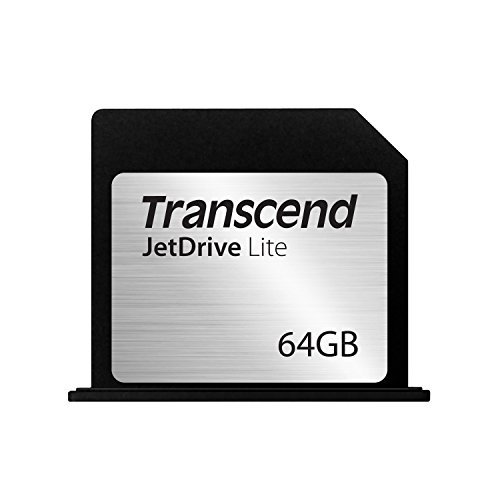
Transcend 128GB JetDrive Lite 350 Storage Expansion Card for 15-Inch MacBook Pro with Retina Display (TS128GJDL350)
₹2,359.00
- Storage Expansion Card for MacBook New Update JetDrive Toolbox (v1.14.3)
- Max Read: 95MB/s, Max Write: 60MB/s
- For MacBook Pro with Retina display 15″ (Mid 2012 – Early 2013)
- Compatibility with Mac OS X 10.11 El Capitan is currently under verification
,
Specification: Transcend 128GB JetDrive Lite 350 Storage Expansion Card for 15-Inch MacBook Pro with Retina Display (TS128GJDL350)
|
10 reviews for Transcend 128GB JetDrive Lite 350 Storage Expansion Card for 15-Inch MacBook Pro with Retina Display (TS128GJDL350)
Show all
Most Helpful
Highest Rating
Lowest Rating
Add a review
Related Products




Transcend 128GB JetDrive Lite 350 Storage Expansion Card for 15-Inch MacBook Pro with Retina Display (TS128GJDL350)
₹2,359.00

Keith. Blakemore-Noble –
My MacBook (15″ Retina Pro) has a 512GB SSD, which is blindingly fast but not quit large enough for my stuff, my photos AND my iTunes library. I used to store my iTunes library (or the bulk of it) on a separate USB drive which helped, but meant carrying the drive as well if I wanted to use it.
Along comes Transcend’s JetDrie Lite, 128GB of storage. “Perfect” I though, “I’ll stick my photo library on there, and I can bring my iTunes library back to my SSD”.
The JetDrive itself is pretty small physically, and comes well packaged.
Installation is easy, just slot it into the Card Reader slot.
Removal is easy too, there is a black flange which presses flush with the side of the MacBook, and you can prise the drive out using a fingernail easily enough should you want to remove it – personally I like the fit-and-forget aspect, it’s in there and I have no plans to remove it (until I sell this machine).
The drive comes pre formatted but for MSDOS which means it is usable but for Macs you are better off reformatting it to native format. Which is fast and easy to do, and the JetDrive instructions tell you what to do if you are unsure of how to use Disk Utility.
Formatting done, it was time to copy my photo library across (all 120GB of it), which took maybe 10-15 minutes but once done was done.
I have to say, the drive is working well. Both iPhoto and Aperture use it with no problems, everything Just Works. As expected.
Speed-wise, do NOT expect SSD or even HD performance! This is sat in a card reader and is rather slower.
It did a comparison of performance using BlackMagic’s Disk Speed Test on my internal SSD, an external USB3.0 had drive, a Thunderbolt external hard drive and the JetDrive, using the same settings for each, and got the following average results.
Internal SSD write 280MB/s, read 395MB/s
External USB write 90MB/s, read 90MB/s
Thunderbolt write 115MB/s, read 125MB/s
JetDrive write 5MB/s, read 50MB/s
As you can see, it is a LOT slower than the others, especially at writing. At reading, it’s just over half the speed of my external USB3.0 hard drive, which means it’s certainly acceptable in terms of read performance. Write is not too bad if you are not doing it often.
So for my application, using it to store my photo library, it’s a great fit – the library is read FAR more often than written to, and reads are far larger than writes, so the performance is OK. And a lot more convenient than having to remember to carry round an external drive!
Reliability is of course an important factor. When I first installed the drive and was copying files across, the drive suddenly disappeared. Remove it physically and reinstall it and all was well, and there’s been no repeat of that one-off occurrence, which I put down to the physical connection (perhaps there was a bit of dust or something in the CF slot, as I do cart the laptop around some pretty strange places). Since then, it has been rock-solid, and I’ve been using it for just over a month so far.
TimeMachine automatically picked it up and added it to its backups, which is helpful.
Overall I’d definitely recommend the Transcend JetDrive Lite, it does the job, it is unobtrusive, performance is acceptable, and for me it is making use of a card reader slot which I never otherwise used.
Ishan Raghava –
The card works very well, and sits flush with the system with only about an mm of the drive poking out. The read/write speeds are quite good, and while they’re not as fast as an SSD, they are quick enough. Highly recommended for those with smaller SSD’s in their MacBook Pro’s.
Amazon Customer –
Have used this product for about 5 months now, works well. Don’t know the actual transfer speeds but it’s fast enough for normal use, and it fits very well in my MacBook. However, it is not designed to be removed frequently, feels like it may break (plastic) if it is removed a lot. I use it mainly for music PLAYBACK . Only drawback is the price, it is REALLY expensive, paid just over 5000 INR.
不凡 –
写真や音楽をこちらに移動しました。
性能、スタイルともに想像通り。これは素晴らしいですね!
Samir V –
Works beautifully. Wished I had bought the 256 gb variant though.
Artur –
Suddenly stopped working after few months.
Santhosh S. –
Just the right fit for Mac and remains concealed. Certainly recommend JetDrive to improve the storage space.
black23mamba –
Una scheda di memoria che si dimentica di averla. Entra completamente nel vano SSD del vostro macbook pro retina 15″ Late 2013 (fate attenzione al modello del vostro mac prima di effettuare l’acquisto), e non influisce sull’estetica del portatile.
La scheda di memoria al primo inserimento deve essere formattata nel formato Mac OS X Journaled, poiché arriva nel formato FAT32.
La velocità in realtà non è quella dichiarata dalla Trascend, in scrittura raggiunge i 60 MB/s contro i 90 dichiarati, e il lettura circa 45 MB/s che sono delle prestazioni apprezzabili considerando che si tratta pur sempre di una scheda di memoria.
La capacità da 128 GB consente di farne svariati usi, dal contenere file multimediali all’utilizzo come disco di backup. Personalmente la utilizzo con time machine come disco di backup portatile quando mi trovo fuori sede, e sono rimasto ampiamente soddisfatto dalle prestazioni di questa scheda di espansione. Unico appunto che mi sento di muovere, è il fatto che dopo l’inserimento non è semplicissima la rimozione della scheda, poiché aderisce talmente bene al bordo del Macbook che si deve utilizzare un oggetto affilato (tipo una lima) per fare leva se non si hanno le unghie abbastanza lunghe, sicuramente sarebbe stata più azzeccata la scelta di un accessorio di estrazione abbinato ovviamente ad una vano per l’inserimento dello stesso (Tipo il Nifty drive per intenderci). Nel complesso, si tratta di un ottimo prodotto che mi sento di consigliare a tutti i possessori di un portatile della Apple, avere un sostanzioso incremento della memoria interna con una scheda di espansione, la ritengo un’ottima scelta.
PS Avevo acquistato questa scheda di memoria frettolosamente, sbagliando la compatibilità con il mio macbook pro retina che è il late 2013. Voglio dare altre 5 stelle al servizio resi di Amazon che è intuitivo e super veloce! Grandi come sempre! Amazon for life!
Raka –
Cheapest way to increase storage on Mac pro ..
Ismael N. –
Estoy bastante contento con la compra, hay que tener en cuenta que no se trata de una unidad de SSD tal y como la que tienen los MacBook Pro Retina.
Recomiendo su uso para almacenar contenido multimedia, fotos, videos, películas… He probado a reproducir un MKV en 1080p desde la tarjeta y va a la perfección, de hecho con lightroom he probado a “manipular” imágenes de una Nikon D800 y se puede trabajar, eso sí con un poco de retardo pero se puede que es lo importante.