

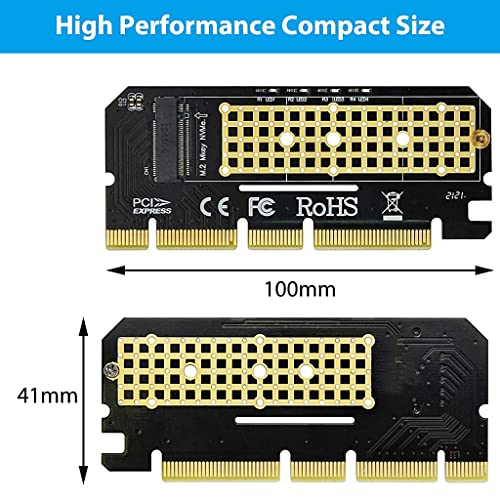
Verilux® NVME Adapter PCIe x16 with Gel Pad, M.2 NVME or AHCI SSD to PCIE 3.0 Adapter Card for Key M 2230, 2242, 2260, 2280 Size M.2 SSD, Support…
₹553.00
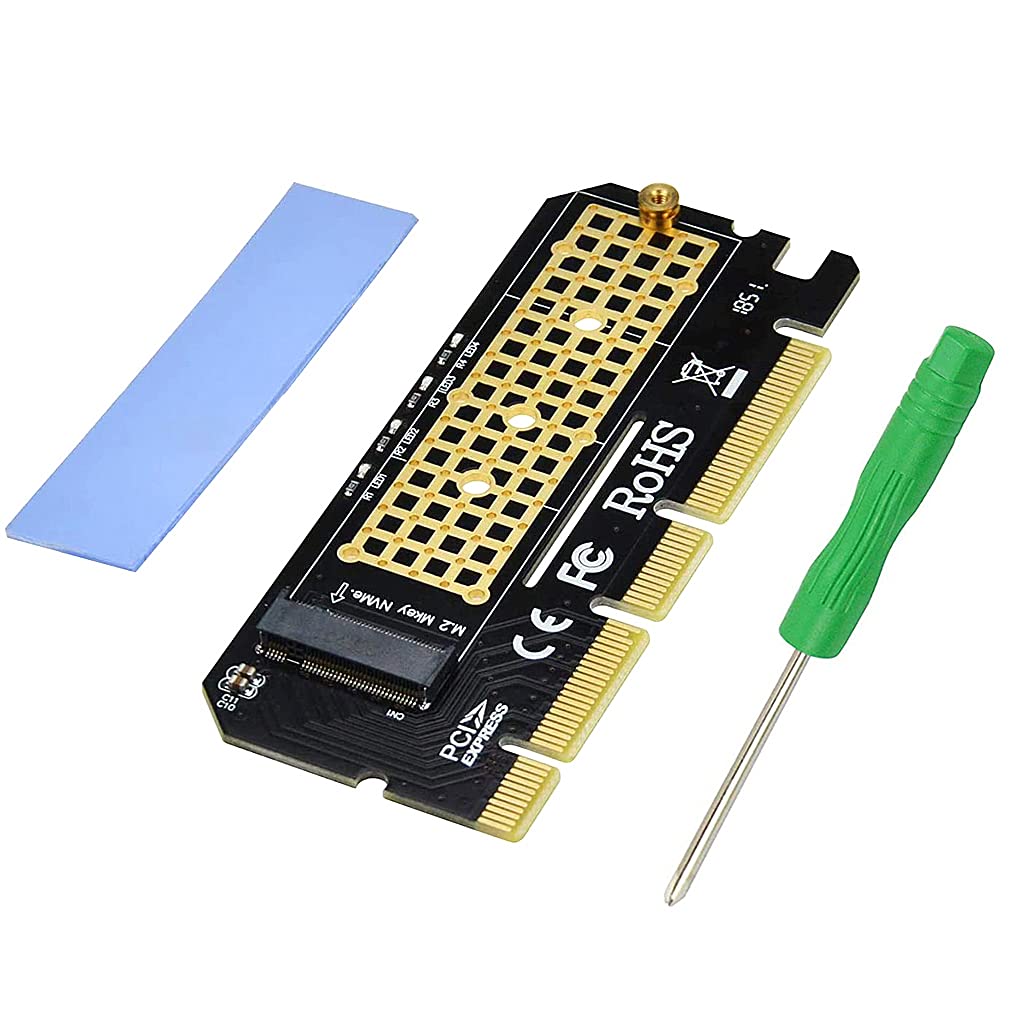
- M.2 NVMe to PCIe Adapter Allows adding NVMe SSD Hard Drive to your PC Desktop at perfect performance.
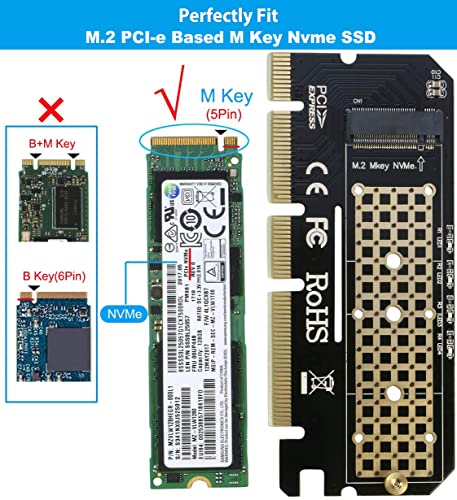
- Please NOTE: 1. This M.2 PCIe adapter can Only Support M.2 PCI-e Based M Key Nvme SSD, DO NOT support PCI-e M Key AHCI SSD, SATA based B+M key or B Key SSD. 2. Please download driver of SSD from the brand official website if “Disk Management” or “Device Management” can not show the SSD. 3. Old MB can not support Booting from “NVMe”, Please confirm the MB’s specification.
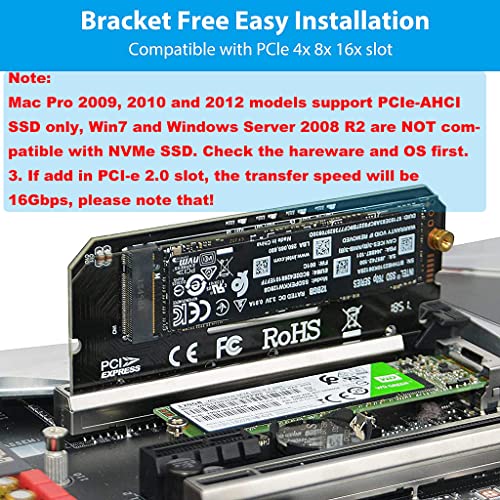
- Please NOTE: Mac Pro 2009, 2010 and 2012 models support PCIe-AHCI SSD only, Win7 and Windows Server 2008 R2 are NOT compatible with NVMe SSD. So please check the hareware and OS first. 3. If add in PCI-e 2.0 slot, the transfer speed will be 16Gbps, please note that!
- Compatible with M.2 SSDs (PCI-e NVMe): 80x22mm, 60x22mm and 42x22mm. Hardware Requirement: Available PCI-e 4.0/3.0/2.0/1.0 x4/x8/x16 Slot on Mainboard
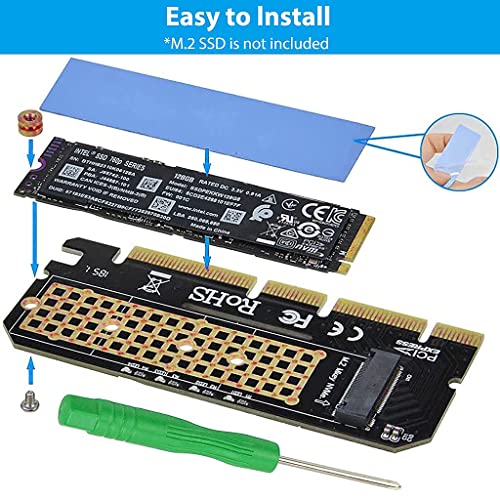
- Package Contents: 1x M2 PCIe NVMe adapter. 1* silicone pad; 1x Screwdriver;
,
Specification: Verilux® NVME Adapter PCIe x16 with Gel Pad, M.2 NVME or AHCI SSD to PCIE 3.0 Adapter Card for Key M 2230, 2242, 2260, 2280 Size M.2 SSD, Support…
|
8 reviews for Verilux® NVME Adapter PCIe x16 with Gel Pad, M.2 NVME or AHCI SSD to PCIE 3.0 Adapter Card for Key M 2230, 2242, 2260, 2280 Size M.2 SSD, Support…
Show all
Most Helpful
Highest Rating
Lowest Rating
Add a review
Related Products


Verilux® NVME Adapter PCIe x16 with Gel Pad, M.2 NVME or AHCI SSD to PCIE 3.0 Adapter Card for Key M 2230, 2242, 2260, 2280 Size M.2 SSD, Support…
₹553.00

Vikash –
Did not function as per expectations, drive is not being detected
AJEET SINHA –
This is just an electrical connector, so speed is dependent on the processor and motherboard, and whether PCIe is connected directly to the Processor or the chipset.
PCIe port connected directly to the motherboard with full 4 lanes – Max speed as per NVMe drive Gen used eg (Gen 3.0 speeds).
PCIe port connected to the chipset with full 4 lanes – reduced speed as per chipset datasheet( e,g gen 3 speeds)
PCIe port connected directly to the motherboard, but it’s on a single lane – one fourth speed approx.
PCIe port connected to the chipset with one lane – Worse speed (e.g, A speed one-fourth of PCIe Gen 2.0)
PCIe port connected directly to the motherboard, but the processor does not support full PCIe Gen3 – Reduced speed as per the Processor manual
For max speed, use the PCIe port that is advertised to be used for the Graphics card(the one nearest to the processor)
NVMe drivers must be present in the OS for detection. For Booting, UEFI BIOS must support NVMe
Balwinder Singh –
1.using this in ASUS B150 PRO GAMING motherboard which has got one slot of M.2 which allows only SATA device
2. installed this card on a PCI-e 3.0 slot (this motherboard is provided with 2 of those slots, one is already occupied with graphics card)
3. i have insatalled Crucial P3 1TB PCIe 3.0 3D NAND NVMe M.2 SSD
4. to my surprise, it booted well windows
5. speed of this SSD is great, im getting full speed of 3500MB/s
6. installation of SSD in this adopter is easy, screws are provided
7. even though it is chinese product, without any proper brand name, it works well
8. it has got a nice blue led
9. very useful for old motherboards lacking nvme
10. it is bootabel and recognized in BIOS, may be mine is UEFI BIOS
Mic raj –
REVIEW – Works just amazing . I am using a Gen3 M.2 Drive and as my both M.2 slots on my motherboard are already full I had to get a PCIe adapter to be able to house another M.2 drive . This one works flawlessly , I am getting 3400-3500Mb/sec Read speeds and 2800-3000Mb/sec write speeds .
INSTALLATION – Please be aware that it comes with a nut and a screw . Some may get confused about how to attach the M.2 Drive to the adapter . All you have to do is peel off the stickers of the blue thermal pad , stick it on the back of the M.2 drive then allign the M.2 drive end (where is basically screws) and put it in the gap of the nut then press the M.2 drive down and screw in the nut from the back side of the adapter with the provided screw . Thats all .
ahamed –
working
pratap –
Good product
Chandan Singh –
Gives 3500 with NVme WD blue and Hikvision on H61 H81 and H110. Worth to buy this one only as PCIe doesn’t give much higher speed. It’s the best product at affordable price. I have ordered 2 more pieces
AJEET SINHA –
Actually I purchased it for Dell Vostro 3470. But unfortunately it dint work. I used for Gigabyte H410m motherboard with 1TB crucial NVMe M2 2230 SSD. Working fine with lightening speed of boot.. Super..