

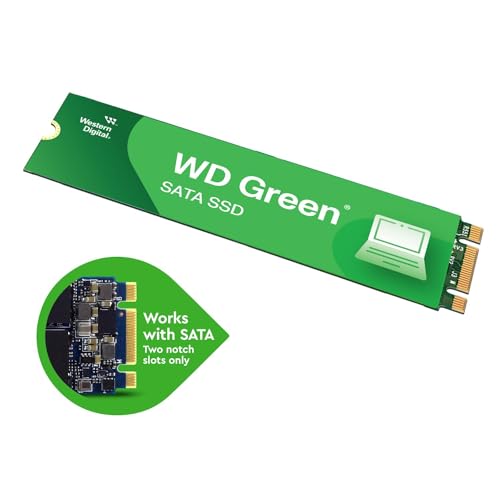
Western Digital WD Green M.2 240GB, Up to 545MB/s, 2.5 Inch/7 mm, 3Y Warranty, Internal Solid State Drive (SSD) (WDS240G3G0B)
- SLC (single-level cell) caching boosts write performance to quickly perform everyday tasks.
- Shock-resistant and WD F.I.T. Lab certified for compatibility and reliability. Sequential Read Performance 545MB/s
Original price was: ₹2,140.00.₹1,749.00Current price is: ₹1,749.00.
Best deal at:  Amazon.in
Buy for best price  Amazon.in
Last Amazon price update was: July 22, 2025 1:17 pm
×
Product prices and availability are accurate as of the date/time indicated and are subject to change. Any price and availability information displayed on Amazon.com (Amazon.in, Amazon.co.uk, Amazon.de, etc) at the time of purchase will apply to the purchase of this product.
Western Digital WD Green M.2 240GB, Up to 545MB/s, 2.5 Inch/7 mm, 3Y Warranty, Internal Solid State Drive (SSD) (WDS240G3G0B)
Original price was: ₹2,140.00.₹1,749.00Current price is: ₹1,749.00.
Description
- SLC (single-level cell) caching boosts write performance to quickly perform everyday tasks.
- Shock-resistant and WD F.I.T. Lab certified for compatibility and reliability. Sequential Read Performance 545MB/s
- Ultra-low power-draw so you can use your laptop for longer periods of time.
- Available in 2.5″/7mm cased and M.2 2280 form factors to accommodate most PCs.
- The free, downloadable Western Digital SSD Dashboard* lets you easily monitor the status of your drive. Includes a 3-year limited warranty so upgrading your storage is worry-free.
,
Additional information
Specification: Western Digital WD Green M.2 240GB, Up to 545MB/s, 2.5 Inch/7 mm, 3Y Warranty, Internal Solid State Drive (SSD) (WDS240G3G0B)
|
Price History
-
Reviews (13)
13 reviews for Western Digital WD Green M.2 240GB, Up to 545MB/s, 2.5 Inch/7 mm, 3Y Warranty, Internal Solid State Drive (SSD) (WDS240G3G0B)
Show all
Most Helpful
Highest Rating
Lowest Rating
Add a review
Related Products



Shubham Rawat –
Did not detect in the laptop and now its not returnable. Worst service by amazon.
KAUSTUBH M. CHATURVEDI –
I’ve been using this SSD for 15-16 days, and speeds are decent as expected from a sata SSD. 500+ MB/s read and 400+ MB/s write. Only buy this if your laptop doesn’t support NVME SSD and you’re upgrading from HDD. It’s around 4-5 times faster than hard drives. It works well for light tasks like web browsing and office work. However, WD doesn’t mention TBW that means it has very low endurance and it possibly use QLC NAND. Avoid heavy workloads to prolong its lifespan.
ishank –
Perfect go for it, best writing speed and and very reliable.
rakesh sharma –
i haven’t checked the read/write speeds or anything specific, but in a laptop that only had a slow ssd, it now boots way faster, so its good as far as I’m concerned.
Victor Cortes G. –
Ótima memória. Mudou a vida do meu notebook
marco antonio –
No hay comparación de HDD contra SSD. Si no tienes unidad de estado sólido en tu pc o laptop, no sabes lo que te estas perdiendo. Resucitó una laptop de 12 años de antigüedad. Si tu necesidad de espacio no es muy grande o tienes disco duro secundario, está bien esta capacidad. Si no vete por el de 480Gb.
Must Bisu –
Fue fácil de instalar, me ahorro espacio, buen precio y buena calidad, solo mencionaré que deben de especificar el tipo de disco.
N –
if you were cash strapped and looking for an ssd to bump up the performance of a laptop, then do go ahead and get this WD green SSD.
It also comes with the Acronis true image software to clone existing disk to the ssd.
the drive is performing well, and there is a massive improvement in the boot/shut down/app loading times. Very good budget SSD for most people who use their systems for basic home/office work.
the laptop in question here used to take 6 minutes to boot up and reach the login screen prior to this ssd. and then another 4 minute wait once logged in , and only then it was ‘usable’. plonk this ssd in, clone it (mind you,not a fresh install of OS) and then the numbers read so.. boot up to login screen: 35 seconds!!! after login: 5 seconds and ready to use. The system is nippy fast and a breeze to use now. the documents, files open quicker, lag free performance.
Vishal Deep –
Works Perfect!
447 gb disk memory visible on ‘This PC’.
The boot time on HDD drive (2.00 min)
Came down to about 30 seconds on SSD.
Placeholder –
The product is very good and very powerful that it is boost performance of my laptop and my laptop is booting up so fast and all my application are working very quick so it is very good to install in laptop or PC where it is important I want to tell the download SSD is best
Placeholder –
Good speed been using for 1 year good speed and good for this price and overall good product buy wd. Must buy
Shubham Rawat –
Many people have recommended me not to get this SSD because of the absence of DRAM, but in my particular case, i didn’t plan to game/use this SSD heavily and installed it on my secondary laptop to give it a new lease of life and most importantly it is one of the most economical SSD listed here.
For now, it has been working flawlessly (M.2 SATA) and i have encountered zero issues with this SSD. I would recommend it for causal users, although not recommended for gamers, i mean you can game on it but if someone is a heavy gamer, I’d recommend a SSD with a higher TBW.
Keep in mind that all SSDs have a limited lifetime and has limited reads and writes. An SSD will generally give you signs before failing. Make sure you understand them and backup your data before they go out.
For even for a heavy user it should take more than 5 years minimum.
Ewan –
I’ve bought many Western Digital Blue SSDs but this is my first green one and I wasn’t disappointed. I installed it for my a basic Dynabook to double the size of the SSD. This SSD has improved the performance of the PC and it was easy to install too. The and the disk cloning software made for an easy migration and Western Digital have plenty of support resources online to help answer any questions you might have, so that even a novice like me can upgrade their laptop.