


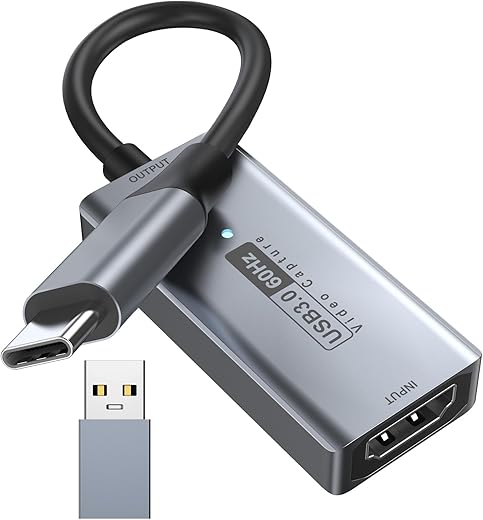
Lemorele Video Capture Card USB C 3.0 with 4K HDMI Loop-Out, HDMI Capture Card for Live Streaming Game Recorder Device, Compatible with Windows…
₹2,399.00
- 【Ultra-low Latency, Gamer’s Choice】 Have you ever scratched your head because of the latency of a capture card? This capture card from Lemorele supports asynchronous settings for input and recording specifications. It can output 4K60Hz video signals, while simultaneously recording 1080p 60 frames to meet different display and recording needs. For entertainment anchors, you and the audience can be in the same time and space. For game anchors, ultra-low latency is the key to victory!
- 【With 4K@60Hz loopout function】 Compared with capture cards without a loopout function, the loopout function of the capture card shunts the input video signal to output. It will not take up a lot of host CPU, GPU, and other resources like some software recording methods. This allows the host to focus more on running games, dealing with professional software and other major tasks, ensuring stable host performance, and in the process of a long live broadcast or recording, it also ensures a smooth, non-lagging screen and improves the overall work efficiency and experience
- 【Easy to use and plug and play】 No complicated drivers required – simply connect the capture card to your computer via USB for instant recognition. Compatible with third-party software such as OBS for seamless HD game streaming and recording. Its compact and portable design makes it easy to carry around. Video feeds immediately after connection with no delay, great for live game streaming and instructional recording
- 【Multi-device connection & excellent heat dissipation capability】 In some scenarios where multiple display devices need to be connected at the same time, such as a game live broadcast, the anchor needs to display the game screen on his monitor and transfer the screen to the computer for recording and streaming. The capture card with loop-out function can easily meet this demand without the need for additional adapters; the large area of aluminum alloy material and low-power chip are perfectly matched, and the excellent heat dissipation capability allows you to use it for a long time without any pressure
- 【Widely Used】Lemorele video capture card is compatible with Mac OS, Windows, Linux, Android, and other operating systems. You can use this video capture device to easily live stream and record video on Google Play, Facebook Live, YouTube, FireTV, BGmi, Airtel Xstream, Twitch, Twitter, Potplayer, VLC, TikTok, and more. It is also fully compatible with PS5, Xbox, GoPro, Jetson Nano, Tata Play Binge+, Raspberry Pi, Canon, Sony, etc. Applicable scenarios include HD capture, video conferencing, teaching and learning recording, medical imaging, live gaming and entertainment, home theatre, etc.
- 【Friendly reminder】 When capturing video, you need to set the output resolution in the capture software, otherwise it may default to 1080P@60Hz
- 【Permanent After-sales Service and Product List】✅Lemorele always offers a one-year product warranty, you can request unconditional return and exchange, and maintain a 24-hour online human customer service to welcome your inquiries at any time. Product list: 1* Video Capture Card, 1* USB C to USB A/C Cable, 1* HDMI Cable, 1* Manual
,
Specification: Lemorele Video Capture Card USB C 3.0 with 4K HDMI Loop-Out, HDMI Capture Card for Live Streaming Game Recorder Device, Compatible with Windows…
|
13 reviews for Lemorele Video Capture Card USB C 3.0 with 4K HDMI Loop-Out, HDMI Capture Card for Live Streaming Game Recorder Device, Compatible with Windows…
Show all
Most Helpful
Highest Rating
Lowest Rating
Add a review
Related Products



Lemorele Video Capture Card USB C 3.0 with 4K HDMI Loop-Out, HDMI Capture Card for Live Streaming Game Recorder Device, Compatible with Windows…
₹2,399.00

Geo Varghese –
The media could not be loaded.
Not good products voice and video not good output
Gabriele –
Trattasi di un digitalizzatore USB per acquisire un segnale video HDMI. L’acquisizione è possibile fino a una risoluzione di 1920x1080p a 60 Hz. Il formato di acquisizione è solo MJPEG.
Il prodotto arriva in una piccola confezione di cartone, contenente l’adattatore USB e un manuale ripiegato a fisarmonica in lingua inglese e cinese.
Il digitalizzatore è costituito da un involucro in alluminio, di colore grigio, di dimensioni 48 x 43 mm, e di 12 mm di spessore. E’ piuttosto leggero e pesa appena 35 grammi. Ha due porte HDMI femmina su un lato, una per l’ingresso (HD-IN) e una per l’uscita (HD-OUT). Dal lato opposto è presente un cavetto di circa 30 cm, non rimovibile, che termina con un connettore USB Type A/Type C modulare (in pratica il connettore USB Type A è montato a cappuccio sopra connettore USB Type C). Non sono forniti cavi HDMI supplementari, per cui oltre al cavo HDMI che già usiamo per il monitor, dovremo procurarci un secondo cavo HDMI necessario per il passthrough.
Il digitalizzatore andrà collegato alla porta USB sul computer che deve acquisire il segnalevideo e sul quale andrà installato il relativo software per digitalizzare tra quelli suggeriti (per esempio “OBS Studio”). In OBS, per esempio, si configura il capture device tra quelli riconosciuti (in particolare dovrebbe essere mostrato “Display capture-UVC04”). Il digitalizzatore ha un chipset Actions Microelectronics. Dopodiché, sempre in OBS, si sceglie il formato MJPEG, e quindi si prosegue impostando la risoluzione (es. 1920×1080) e il framerate (es. 60 Hz), oppure si lasciano i valori di default. Terminata la configurazione occorre riavviare OBS.
Notare che, all’interno del software OBS, si deve aggiungere anche l'”Audio Input Capture”, altrimenti la sessione registrata sarà priva della traccia audio.
Tra gli elementi negativi, il manuale, in cui le figure relative agli screenshot di OBS per le impostazioni, sono troppo piccole, sgranate e poco leggibili.
Il digitalizzatore ha anche una porta HDMI OUT passante, a cui collegheremo il cavo HDMI che va al monitor. Se vogliamo digitalizzare un segnale proveniente da un laptop, potremo anche omettere di collegare l’uscita HDMI OUT, e configurare semplicemente il laptop con la modalità screen mirroring.
Da test eseguiti, collegando due laptop (uno in playback e l’altro in capture), sia con Windows che con Linux il digitalizzatore è stato in grado di acquisire correttamente video fino a 1920x1080p con framerate fino a 60 Hz. Se in OBS si utilizzano le impostazioni di default, tuttavia, è risultato un certo ritardo (misurato in circa 100ms), tra il segnale audio e il segnale video (con il video in ritardo), mentre impostando manualmente la risoluzione a 1920×1080 e il framerate a 60Hz, il ritardo (lag) del segnale video è stato inferiore a 50 ms. Non si sono riscontrati frame drop. E’ comunque importante che in OBS, la scelta della qualità del file prodotto e la velocità di acquisizione siano proporzionali alla potenza della CPU a disposizione: se infatti il computer che esegue il capture è troppo lento, allora il file in uscita prodotto potrà presentare un frame drop eccessivo.
Nel complesso è un buon prodotto, per quanto all’inizio occorre fare un po’ di tentativi per trovare i settaggi migliori in OBS.
Trippy Ankit –
So, I was a bit skeptical after reading some negative reviews, but I went ahead and got this thing because, you know, it seemed like a better deal based on my research in this price range and had better reviews, when compared to others. And hey, turns out it’s pretty cool! It’s tiny, it has this sleek aluminium casing which gives feeling that it’s good quality.
Been using it for about a month now, mainly for streaming games from my console. The max quality that I am able to stream is at 1080p, 30 FPS (as I have PS4), though in obs setting it shows higher resolution 4K capability. Maybe my console’s holding it back, who knows? But, no major hiccups, and the video quality stays solid even during those marathon 5 to 6-hour gaming sessions.
This also, works like a charm with my MacBook Air, but here’s the catch – only with the Apple cable. The one in the box won’t work for the MacBook. Weird, right? But for my Windows laptop, the in-box cable does the job just fine.
All in all, I’d say it’s a pretty sweet deal. Cheapest & best.. Not sure, what’s the difference between this and those expensive Aver Media & Elgato capture cards. But for sure in future if I get any of those expensive ones, I will compare it and post it here.
If you’re currently on the lookout for a budget-friendly option and want to save some cash, don’t overthink it – just give it a shot. And hey, if you’re in a grateful mood, consider dropping by & subscribing to my channel ‘TrippyAnkitGaming’! 🫣
Not your average reviewer –
I believe this is best capture card in this price range under 2.5k ( 4K 30fps capture card )
This is products bad for purchase do not bay –
The media could not be loaded.
Ho acquistato questo cavo per collegare il mio portatile al proiettore con risultati veramente fantastici, la resa video è veramente ottima e fluida senza ritardi o perdita di definizione, anche l’ audio viene trasmesso alla soundbar con ottima qualità… Giocare a simulatori sui 150pollici del proiettore è veramente fantastico… Testato anche con la TV e la resa è altrettanto buona, nessuno difetto da segnalare. Basta collegare il cavo e non serve fare altro. Prodotto consigliato.
SANTOSH S. –
The product did not work and it gave a no signal output when I connected to ps4 and pc respectively. Even the replacement model gave the same damn error. I’m very angry at this product and got no support from company also.
Mr M P H Merriman –
J’ai testé cette interface de capture vidéo HDMI vers USB, sur mon PC portable :
C’est du Plug and Play ! Il suffit de brancher la source HDMI de son choix (la sortie HDMI d’un PC fixe dans mon cas, ou bien-sûr… une caméra avec sortie HDMI) sur l’entrée de l’interface. Source que l’on pourra réccupérer sur un écran de contrôle (soit l’écran de mon PC fixe… pour cet essai) grâce à la sortie HDMI du boitier. L’interface de capture vient ainsi simplement, s’intercaler sur le signal HDMI à recopier.
J’ai ensuite installé OBS pour pouvoir faire la capture sur mon PC portable… et sélectionné “Display capture UVC-04” comme source d’entrée.
Le fonctionnement est immédiat; on a bien la source qui s’affiche “en live” dans OBS. Plus qu’à l’enregistrer sur le PC… voir lancer sa diffusion en streaming, en direct !
Cet essai est donc concluant. Pour vraiment pas cher… on peut faire de la production vidéo en 1080p 60Hz !
Je peux donc vous conseiller cette interface de capture. Elle fonctionne très bien, sans aucune complication ni configuration à faire. Il y a juste le boitier (en aluminium) qui chauffe un peu… mais c’est normal, il faut bien faire la conversion du signal HDMI vers l’USB !
Not your average reviewer –
The media could not be loaded.
I don’t know what the other reviewer is talking about the capture card not doing more than 1080@60FPS but I’m pretty sure it’s user error. This Lemorele AC06 capture card can certainly go beyond 1080p and is amazing value at the moment when nothing else in this price range can do 4K or even 1440p!
All other cheap (sub 1K INR) capture cards on Amazon (based on Macro Silicon MS2109 chipsets) only capture output video at 1080p@60FPS even though they support input video resolutions upto 4K@30FPS. The AC06 can capture output video at 4K@30FPS, 1440p@60FPS, 1080p@60FPS and other configurations but nothing above 60 FPS at any resolution.
I haven’t opened this one up yet so I don’t know exactly what’s inside. I tried capturing gameplay from my gaming laptop and PS5 using OBS and both worked flawlessly. It captured 1440p@60FPS and the video is smooth. The video quality is pretty good but since it’s a compressed MJPEG stream, it’s not as high quality as the input video. The AC06 can also do 4K pass through so you can play and capture at the same time. Pass through works at 1440p@60FPS resolution as well on the PS5 however there’s no HDR support and VRR doesn’t work either. The device doesn’t excessively heat up like all the sub 1K cheapo capture cards and was just barely warm after I used it to capture gameplay and passthrough video from the PS5 for at least 2-3 hours.
I must admit, the initial setup is a bit tricky because PS5 wouldn’t send it a video signal above 1080p@60 even though my PC didn’t complain about doing 1440p@60. I had to disable HDCP on PS5 (Settings->System->HDMI) for the video output to be passed through and if I selected a higher (>1080p) capture resolution in OBS, the AC06 would error out with the “HDMI resolution is smaller than UVC capture. For better fitting, please adjust HDMI input source or change UVC resolution setting” message on screen.
I didn’t want to disable HDCP so I reached out to Lemorele support and they told me that the small hole on the unit which has a blue LED in it is hiding a button which when pressed (using a SIM card ejector tool or a pin) changes the ‘video acquisition mode’ that helps with PS5 video capture. I tried it out and to my surprise, it worked! After pressing the stealthily hidden button, the AC06 can now capture video with HDCP enabled and it also fixed the problem I was having with the AC06 only capturing in 1080p and not passing through 1440p to my monitor. Lemorele Support has been outstanding in this regard and I highly recommend getting the AC06.
Pros:
1. Capture upto 4K@30FPS
2. Capture 1080p@60FPS, 1440p@60FPS
3. No need to disable HDCP for video capture
4. Decent capture quality
Cons:
1. No 4K@60FPS or 1440p@144FPS capture support
2. No HDR capture or passthrough support
3. No VRR passthrough support
4. MJPEG format capture only (video is compressed and lots of artifacts)
5. Works over USB 2.0 only (480 Mbit/s throughput). No USB 3.0 support, so no higher quality YUY2 capture supported which requires USB 3.0 to transfer large amounts of uncompressed data
If you need higher quality video capture, you’re better off buying something like NZXT Signal 4K30, Asus CU4K30 or Elgato HD60 X which actually works over USB 3.0 and you can capture 1080p@60FPS HDR footage (or 4K@30FPS) while doing 4K@60FPS with HDR and VRR passthrough. They’re way more expensive though (6-7x more at least).
I purchased the Lemorele AC06 for 2399 INR but days later it went down to 2159 INR. Despite its flaws, I’d highly recommend it for the low price – 9/10
Gabriele –
Quite nervous initially, wasn’t sure I had got the right product but it was in fact perfect for the job.
Good value
Joel Moses –
Very innovative high quality product. 1080p Video recorded using this device is very smooth and easy to use. Comes with all necessary accessories
Himaagni –
The product works fine for the first 20 mintues and then the screen glitches until you unplug it and plug it back in. Sometimes it doesn’t capture audio. I’d recommended you too go for a higher end product. Cheap capture cards will mostly never work fine
Yes’ Bro… –
30hz is so less i can feel the jitter and lag
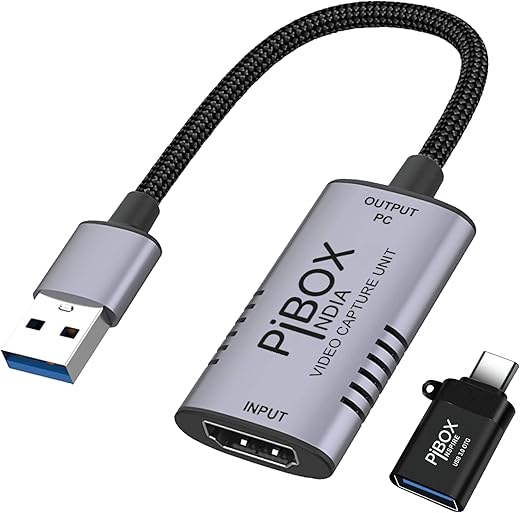
if its 60hz it should be great I returned and going to buy PiBox
Giuseppe G. –
Die Lemorele Video Capture Card ist eine zuverlässige Lösung, um Videosignale von Kameras, Konsolen oder Computern einfach aufzuzeichnen oder zu streamen. Sie unterstützt eine hohe Auflösung und bietet eine reibungslose Übertragung ohne spürbare Verzögerung. Die Einrichtung ist unkompliziert, da die Karte plug-and-play-fähig ist. Ideal für Content-Ersteller und Gamer, die ihre Aufnahmen in guter Qualität erfassen möchten. Ein gutes Preis-Leistungs-Verhältnis für den Einstieg in die Videoproduktion.