
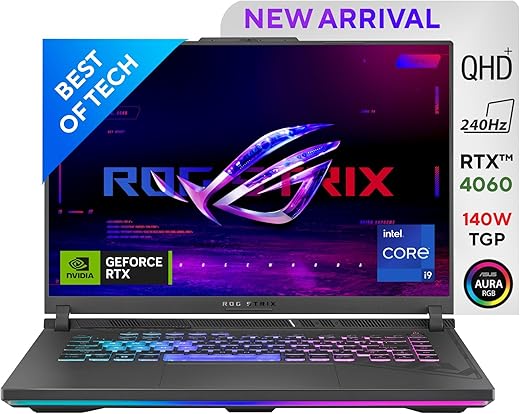


ASUS ROG Strix G16 (2023) Gaming Laptop, 90WHr Battery, Intel Core i9-13980HX 13th Gen, 16″ QHD+ 240Hz, 8GB RTX 4060 (16GB/1TB SSD/Windows…
₹164,990.00
- Processor: Intel Core i9 Processor 14900HX 2.2 GHz (36MB cache, up to 5.8 GHz, 24 cores, 32 threads) enhanced for lag-free performance
- Graphics: Dedicated NVIDIA GeForce RTX 4090 GPU 16GB GDDR6 VRAM
- Memory: 32GB DDR5 with SO-DIMM | Storage: 2TB PCIe 4.0 NVMe M.2 Performance SSD
- Play over 100 high-quality PC games, plus new and upcoming blockbusters like Halo Infinite, Forza Horizon 5, and Age of Empires and EA Play including one month of Game Pass.
- With new games being added all the time, there’s always something new to play. Age of Empires IV, Back 4 Blood, Battlefield V, Forza Horizon 5, Halo Infinite*, Knockout City, Microsoft Flight Simulator, Minecraft PC Bundle, Need for Speed Heat, Psychonauts 2, The Sims 4, Titanfall 2, 12 Minutes
,
Specification: ASUS ROG Strix G16 (2023) Gaming Laptop, 90WHr Battery, Intel Core i9-13980HX 13th Gen, 16″ QHD+ 240Hz, 8GB RTX 4060 (16GB/1TB SSD/Windows…
|
5 reviews for ASUS ROG Strix G16 (2023) Gaming Laptop, 90WHr Battery, Intel Core i9-13980HX 13th Gen, 16″ QHD+ 240Hz, 8GB RTX 4060 (16GB/1TB SSD/Windows…
Show all
Most Helpful
Highest Rating
Lowest Rating
Add a review
Related Products




ASUS ROG Strix G16 (2023) Gaming Laptop, 90WHr Battery, Intel Core i9-13980HX 13th Gen, 16″ QHD+ 240Hz, 8GB RTX 4060 (16GB/1TB SSD/Windows…
₹164,990.00

Arjun Singh Thakur –
It’s absolutely amazing. The display is gorgeous and pretty color accurate from factory as long as you’re using the calibration that GameVusual applies. Personally I just calibrate everything myself anyway but the factory calibration is pretty solid.
CPU performs as it should and can sustain 30k-31k cinebench r23 @100w with custom fan curve.
GPU overdelivers. Got a blender benchmark (v3.6) score of 3800+
I had bought an Acer Predator Helios Neo 16 with an i9 14900hx and 4070. The Asus outperforms the CPU by 20-25% and the GPU is only 12% worse for my workloads. The main issue with Acer i had was their predator sense software which made the PC unusable. That software defaults to balanced mode after each reboot with external display and AC power connected which throttles CPU and GPU to extremely low power which makes everything 60% slower. So even even the AC is plugged in, the software goes to balanced mode and the predator sense app glitches out and the only way to fix that is to reinstall PS and some IO drivers but that only lasts till I reboot.
Acer customer support got remote access to my PC twice and couldn’t fix it. I even formatted the whole system (btw windows installation won’t detect the SSD, beware) and even that didn’t fix the issue. I returned that and bought this Asus and it’s wonderful.
Abhijeet Singh –
The media could not be loaded.
Very fast processing, great for progamming and development. My major use case is programming and development. For SpringBoot development it can manage easily running simultaneously 5-6 Intellij Idea Ultimate springboot applications, Docker engine running more than 5 containers, MySQL server, MongoDB server, postman, notepad++,10-12 chrome tabs with two tabs playing video at 1080p or more and with all these applications CPU usage never cross more than 15% and any if these applications ever hang. Only issue is with RAM shortage which crosses 90% but that depends only on one’s personal usage and moreover it can be upgrade to 32GB(5600Mhz DDR5).
Pros: 1. Very fast CPU
2. Even though CPU is best in laptop segement the display is the best feature. 2k resultion 240Hz 3ms
3. Laptop body feels like metallic not sure about the material. bottom part is hard plastic and of very sturdy build. Hinges are also very strong.
4. Games i’ve played are only NFS heat and Valorant. with highest ultra settings(2k) i’m getting 130FPS and 200+ fps respectively. For valorant if playing with medium setting in 1080p it crosses 500+fps. It is good in a laptop segment. Temprature peak upto 73C (15C room temperature)
5. We can optimize the GPU usage and CPU usage, how many Cores we need, everything can be optimized as per our usage.
Cons.
1. Battery backup is the issue. It can be used upto 3+ hrs with optimal settings.
2. RAM is less for certain taks. It can be upraded but it should be 32 GB for this price point.
3. Power cord is 16A, so you will need a 16A socket to charge it or you’ve to buy a convertor.
To summarize above points, this is a great buy if you only want a LAPTOP, becuase with 2 lakhs you can build a decent PC with better specifications. I needed a laptop as i travel alot but otherwise i would have opted for PC build. I checked the price with showroom, amazon is cheaper but you’ll not get any laptop bag or free accessories even keypad protector is not provided.
Sumiran –
(Review has been updated on Fri, 6 dec 2024, see at bottom)
So i purchased this laptop on 23 November 2023 and it got delivered to me on 26 November 2023. And this is my first gaming laptop.
Let’s talk about upgradability first (from what i experienced)
1) RAM
Ram can be upgraded to 64gb, it came with 2x8gb ram sticks then i bought the 32gb ram and replaced with one of those 8gb ones, now my laptop running with 40gb ram without any problem. I bought the same frequency ram as stock ones 4800 mhz. I wasn’t sure if 5600 mhz ram will work at it’s full speed, so i didn’t take any chances but after so many research i found out that the max speed you can run is 5200 mhz with the latest bios, though you have to enable it through bios.
And you can upgrade the ram upto 64gb, better to look at Intel’s official site for your specific processor for the max ram support.
2) STORAGE
It has 2 slots, laptop initially came with 1TB micron ssd, so i purchased another 1TB ssd of crucial company (parent company is micron). You can use any company of ssd you want, it doesn’t matter. I’m not sure if you can fit 2tb in each slots the max upgrade i can confirm is 2tb by combining both slots.
You can also upgrade your wifi card as well.
3) DESIGN, BUILD QUALITY AND FEEL
Loved the design of this laptop,and great build quality. it has a combination of premium plastic and alluminium. It has aluminium back panel, a glass touch pad. You can lift up the panel with one hand without holding the laptop with another hand. Keyboard has a little flex typical for laptops but looks really good with rgb on but it lacks the visibility of letters written on the keys when you turn off the rgb, only 4 keys are highlighted with white colour W, S, A and D, other than these four keys, rest keys are solely dependent upon rgb lights underneath it.
4) DISPLAY
I play games and do other works at 1200p (the best resolution for this 16″ inch QHD+ display size in my opinion). Even though the laptop has QHD+ screen, trust me 1200p for that size of a screen is the best way to juice out the best performance while maintaining the quality, you won’t notice a difference in picture quality, yup 1600p will surely give more sharper results. Suppose if you are watching any content or doing stuffs like photo editing or doing photo/video editing, then you’d want the picture quality to the best your laptop can provide then set your display resolution to 2560*1600p. The display is amazing it produces sharper images and rich colours all thanks to 100% DCI-P3 colour gamut, it covers more colour range than of 100% sRGB. You will fell in love! So for me 1200p is a sweet spot for gaming and other work in a 16″ QHD laptop.
You can enjoy the HDR contents! with Dolby vision & atmos, totally takes care of your entertainment side.
5) PERFORMANCE
I personally like to play games at 1200p, there’s like 20-30% difference in picture quality between 1200p and 1600p so it really doesn’t matter, i wanted performance without loosing the picture quality. The performance difference is huge between above mentioned resolution. I suggest you play games at either silent mode or manual mode. The silent mode doesn’t let your cpu go too hot means it stays on and below 86°C whatever you do, however your cpu intensive games could become laggy. In manual mode your laptop becomes power hungry better plug it and play. It will give you the max performance. To get better temps you can adjust power limits and crank up the fans a bit btw all these settings are adjustable in armoury crate app.
The following games I played at 1200p and screw refresh rate was set to 240 hz (oh man it’s butter smooth) and in manual mode in armoury crate ( with latest bios 321 as of Friday 22 December )
Assassin’s Creed Odyssey – Maximum settings – 100 fps – max temp 96°C & low 86°C – manual mode
Battlefield 5 – max settings – ray tracing off – 140 fps – max temp around 95°C and low 87°C
Battlefield 2042 – max settings – ray tracing off – 100 fps – temps same as above
Cyberpunk 2077 – max settings – ray tracing off – 70 fps – max temp 97°C & low 90°C
Till now i play these games only, will update later.
6) My Opinion
It’s fulfilling my needs so i have no complaint. I bought this for casual gaming, photo editing & graphic designing, 3d rendering & animation and video editing.
This in my opinion is the best rtx 4060 graphics card laptop under 2 lakh. It has the latest RTX 4060 sa that it’s only 8GB but it’s better than last gen’s RTX 3060 in many ways, yes not a huge upgrade, better wait for 2 more years for rtx 5060 to come if you can. It has QHD screen, 240hz refresh rate with 3 ms screen response time, Dolby Vision & Atmos support, HDR support, 100% DCI-P3, 100% sRGB, AND 75% Adobe RGB, and G-Sync. That’s more than enough for me, this beast is filled with features worth every penny.
And FINALLY! it has the flagship laptop processor of the year the i9-13980HX !
7) LIQUID METAL!?
Asus claims it reduces temp upto 10° more than normal thermal paste. I don’t have a lot to tell about this but somewhere i feel like it is doing it’s magic.
8) CONS (maybe)
It heats a lot but laptop tends to heat a lot. What would you expect with such a tiny beast having 24 cores with a compact design. As someone said in the comment section that it is recommended to use the laptop in an air conditioned room to keep it cool but even in the coldest season the place where i live the temps go as low as 10°c at night, and in that temp, this laptop still reaches 95°C in perfomance mode and in manual it even touches 100°C (only 10% of the time) sometimes, good thing is it doesn’t stay on the same temp for more than a second the average i would say is 93°C.
I don’t know if it’s with my unit only ( BIOS version 321). Other than this it has another bug which is regarding brightness, you can’t control brightness through keyboard, the brightness button provided on the keyboard doesn’t work, I assume that it is probably a bug.
Will upload more photos later for this review.
***Update after an year of use***
Let me tell you something, this piece has not given any problems even after a whole year, I’ve not used it so intensively and condition may vary for others but I’ve used it moderately.
Yup asus have been failed to fix the brightness button problem even after an year and in a one year time span i almost got 4 BIOS update. Asus gives frequent softwares and driver updates which is absolutely a good thing for the laptop.
Recently I’ve been playing Uncharted 4, everything was running smoothly at ultra settings on 1200p, haven’t seen any performance issue after one year of use so I’d give it 9/10.
Battery life ? I rarely run my laptop on battery power so can’t say about this but haven’t got any bettery related issues yet. working fine. I always use my laptop when it’s plugged in. (It’s generally for gaming laptops)
Another good thing is that this laptop has very amazing dust filters, but still you should clean your laptop Every 3 months if you are moderate user like me, but if you are a heavy user I’d recommend cleaning every one and a half months. I use toothbrush and blower to clean it. Don’t worry, there won’t be any short circuit while cleaning as you open the back the battery gets disconnected automatically it has a senser, how amazing isn’t it.
I might update sooner if i run into any problems or just for a quick update.
Thanks for reading!
Abhijeet Singh –
ASUS has by far been the worst company I have had experience with. My laptop got issues 3 times during ita warranty. But they were not able to diagnose the issue. And now im stuck with this useless expensive machine all my life.
2 lakhs is a total waste on this product.
Please dont buy.
Sumiran –
Worthy product, useful to gamers