
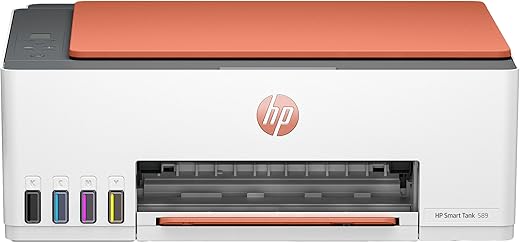


HP Smart Tank 589 All-in-One WiFi Colour Printer – 30 Ppm Speed, High Capacity Ink Tank, Wireless, Ideal for Home & Office Printing, Magenta
- Perfect for Home and Office with print, copy and scan
- WiFi and Hi-Speed USB 2.0 Connectivity
- Achieve sharp, professional-quality prints with HP GT5390-ml/ HP GT53XL 135-ml Black Original Ink Bottle and HP GT52 Cyan/Magenta/Yellow Original Ink Bottle
Original price was: ₹17,828.00.₹12,999.00Current price is: ₹12,999.00.
 Amazon.in
Original price was: ₹17,828.00.₹12,999.00Current price is: ₹12,999.00.
Description
- Perfect for Home and Office with print, copy and scan
- WiFi and Hi-Speed USB 2.0 Connectivity
- Achieve sharp, professional-quality prints with HP GT5390-ml/ HP GT53XL 135-ml Black Original Ink Bottle and HP GT52 Cyan/Magenta/Yellow Original Ink Bottle
- 1-year warranty
- Print speeds of up to 30 ppm (black) and 24 ppm (color)
- 100-sheet input tray and 30-sheet output tray capacity
- Supports variety of media sizes including A4, B5, A6, DL envelope and legal
- 33-segment + 1.2-inch Icon LCD display and various user-friendly buttons
- Compatible with Windows 11/ 10, macOS 10.15/11/12.Duty cycle of up to 3,000 pages per month to handle high volume printing
,
Additional information
Specification: HP Smart Tank 589 All-in-One WiFi Colour Printer – 30 Ppm Speed, High Capacity Ink Tank, Wireless, Ideal for Home & Office Printing, Magenta
|
Price History
Reviews (8)
8 reviews for HP Smart Tank 589 All-in-One WiFi Colour Printer – 30 Ppm Speed, High Capacity Ink Tank, Wireless, Ideal for Home & Office Printing, Magenta
Add a review
Related Products





Abloon Naik –
Product is good… Not very deficult to installation. Easy to install and easy to use, it give a little trouble, when I’m trying to connect through Wi-Fi. And it’s plus point is, that you connect your printer to interne or wifi, you should print directly through mobile, wherever you are,no need to connect with same WiFi network. I think, company should give a free cover for the printer…
Karthikeyan Krishnan (KK) –
No appointment, no support on installation.
Bad experience for supposed premium product. Did not expect such low standards fro HP or Amazon.
Edit– took 4 days, but support showed up. Demo was meh. Errors on day 1, cleared on reboot. Very noisy. It cannot be left on at night. Keeps making random klacking and other printing noises when not in use.
martin –
Ease of use:
Easy to use
Quality:
Quality is very good.
Santosh Wakhloo –
The media could not be loaded.
Note: before setup hp smart app download firmware update from hp website and update the printer firmware will solve your issues.
Initially i have faced lot of issues fed up. I have been previously used printers based on the experience i have setup the printer basics. The real problem came when using the HP smart app. Initially there were 2 wifi frequency one without password another one with password to use with router. Somehow manged to finish setup with mobile. Then the real problem is Pc.
I have setup printer via usb cable and done common setup with windows for print. Then i have tried with Hp smart. I have manged to prints but scan didn’t worked with usb but it worked with wifi. So i tried drivers software from hp website that only gave me headache. Then i have removed all the software and tried next day with only hp smart app. One thing solved my all issues is firmware update of the printer.
Features with explanation to how to do them
1. Got it for the price of 13600 rs
2. Box content: black XL and colour ink, Data cable, Powerchord, printer with manual and bookelets etc
3. It supports xerox of black & white and colour
4. You can do id card print for that select id and put your id card on the scanner and close the lid once it scanned it will indicate on the display for other side scan now put other side of the id card in the scan area anywhere. Once it’s done you will get the id card print on same page
5. It supports wifi direct . For that you need to connect with printer wifi , you dont need to press any button on the printer after turned on. Just press i symbol button to know the password for the printer wifi through print. The wifi password will printed on the paper . So
You can conncet with that password and use Hp smart app and HP print service plugin app also.
6. You can print Or scan with mobile and PC using HP SMART. For pc you can use native print and scan apps from windows.
7. For pc you can use your mobile as router for remote usage.
8. For the speed of printing via pc usb max 7 to 8 for handwritten scanned copy and for the typed document it printed around 11 pages per minute awesome and any one of the pages had small error in printing. (All Black) (initially i have only changed the setting on the printing page of the pdf reader recently i have changed the setting for graycycle in hp settings to black only and it increased the speed to 12ppm). Colur Quality is good it took 30 sec to print photo on A4 sheet.
9. I have fixed all issues only issue i can’t fix is multiple paper is sucked at same time. So i have tried 80 gsm solved the issue 90%. ( This is less after 1st printing because in the initial the cartage alignment causes this issue so add paper after 1st print to avoid this) .
10. The free smart watch program ended for 589 for other products it will end on Aug 15. Who are all purchased between jul1 to jul15 you can get the serial number in warranty slip that you can get from App or Pc version.
Cons
1. It won’t support older windows os like 8.1, 8,7 so be aware
I have searched lot for the selection of printer brother is the less cost high ppm no display and epson high cost high ppm mainly i have choosen hp for the service and spare availability.
Tips:
1. If you press i symbol once turned on it will give you basic details like wifi direct password, no of prints done etc
2. If you press wifi symbol twice it will give the print out of how to connect with wifi
3. Print ateast one page for week black and colour to avoid ink clog & dry.
4. There is support you can get from either hp virtual assistant or service center
5. To avoid multiple papers sucked at sametime using 80 gsm giving better results will update after long time.
6. Who are all facing warranty mismatch contact hp customer support with warranty slip( that has the serial number of printer)& invoice to update your warranty information.
Pritam Ghosh –
Printer Arrived in good packing. Was installed perfectly and is working fine. Happy with the product and service
Abloon Naik –
Initial Impression is good, however it gave me trouble setting up the wifi. The printer was not detected for a while from any device. However, it got resolved when we restarted the printer. Print quality is pretty good. Print speed is decent.
Abhash Kumar –
got my new printer but it was having some Print head issue but Hp support team (Sharukh)helped me with constant follow-up and arranged service engineer to replace the header and now printer is working fine. Great Service by Hp team….😊
martin –
I received the product in good condition and got the HP online support to configure the printer around 2 hours to setup over the video call. I had raised a request to demo from HP support and they came on 18th July 2025. Mr. Madhan & Mr. Karthi from HP support have clearly explained about the printer usage. Thanks a lot and Kudos to Mr. Madhan & Mr. Karthi, HP and the seller.