
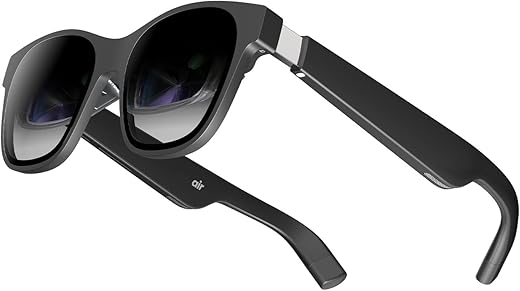


XREAL Air AR Glasses, Smart Glasses with Massive 201″ Micro-OLED Virtual Theater, Augmented Reality Glasses, Watch, Stream, and Game On…
₹51,518.00
- Welcome to the era of portable display built on cutting edge AR technologies with industry-leading image quality.
- 【Easy On The Eyes】Easy to wear at 79g of weight, TÜV Rheinland-certified eye comfort.
- 【Expansive Compatibility】Compatible with iPhone, most Android phones, Windows/Mac laptops, Steam Deck, Nintendo Switch and ROG Ally (may require additional accessory).
- 【100% UVA/UVB Protection】XREAL AR Glasses offer complete protection against UVA/UVB rays for outdoor use.
,
Specification: XREAL Air AR Glasses, Smart Glasses with Massive 201″ Micro-OLED Virtual Theater, Augmented Reality Glasses, Watch, Stream, and Game On…
|
5 reviews for XREAL Air AR Glasses, Smart Glasses with Massive 201″ Micro-OLED Virtual Theater, Augmented Reality Glasses, Watch, Stream, and Game On…
Show all
Most Helpful
Highest Rating
Lowest Rating
Add a review
Related Products




XREAL Air AR Glasses, Smart Glasses with Massive 201″ Micro-OLED Virtual Theater, Augmented Reality Glasses, Watch, Stream, and Game On…
₹51,518.00

Dan –
This product is a display and speakers ONLY and the glasses need a usb-c video source to power on. I ordered Xreal beam also and it enhances the experience well. I will write another review for that separately. Without the Xreal you will be limited to only one display mode (where user is looking) and there is no orientation awareness.
This does work with iPhone 12Pro lightning port but you really need to look at your phone screen to often to get use out of them (e.g. face recognition or browsing) but you could watch streaming apps in full screen mode I guess. I used it to plug-n-play literally to Windows work laptop and detected as secondary display at 1080p resolution.
It took a couple days to get used to working like this as a developer used to 3 monitors. Visual Studio is totally usable with these. However when I am not at a desk with monitors it is the next best thing. The video quality is great, the brightness (adjustable from the glasses) is great even without the shroud. There is no lag whatsoever.
Glasses sit naturally on the nose with no complex adjustment out of the box for me (Caucasian nose). They are light weight and I have worked all day with no discomfort (skin denting is about same as wearing sunglasses). My eyes were not strained after 3-4 hrs without removing. The only viewing issue I have noticed is at the extreme peripheral corners of the display smaller fonts (approx. 6 pt.) are a little fuzzy without pushing the glasses closer to the eyes or un-natural wearing angle. Example windows OS date-time on lower right corner is a little fuzzy but readable.
Socially i have not noticed many stares (I wouldn’t care either) but sitting is meetings might be awkward. The speaker are audible from 8+ feet to others (so no privacy) but you could use ear pods for audio. I noticed people commenting that I was starring off (not looking at my screen) and this technology is new to most people. Therefore I was described, I look like a white Ray Charles (blind guy) talking to my self in public. This is like when blue tooth ear pieces initially hit our society and people seemed to go around talking to themselves but we don’t think much of it today. I think they fact these glasses can by overlooked as sunglasses in public are a positive.
As of Nov 2023 they were retail at 270$ which is comparable to a decent vesa monitor but you can pack up easily and take anywhere you go. If you work regularly away from your desk (I need a change of env to think sometimes) and feel you need a 2nd display to be productive then I would advise using these. They are comfortable glasses and portal decent display monitors. If you need more than that then definitely add the Xreal beam. Using the Xreal beam you can get 5+ hrs of use on the go also and you get more functionality than the glasses alone offer.
Gerardo Meillon –
Tenia mis dudas de comprarlas, pero sin duda son las mejores del mercado, han solucionado sustancialmente el problema con los sensores de movimiento. Sin duda tener las 3 pantallas virtuales para trabajar en tu computadora es otro nivel.
DDC –
This is my favourite tech at the moment.
Please note, these are not VR glasses.
Using with PC:
You need to plug it into a usb-c port or buy a converter from usb-c to hdmi if your PC doesn’t have a usb-c port.
For Windows, it will just replicate the screen so you can use it as your main display. The screen remains in front of you, even when you move your head.
For Macs, you can download and run XReal Nebula software which let’s you create multiple virtual desktops that can be pinned in virtual space.
It looks excellent.
They are still developing the Windows version.
Android phone, you will need to download XReals Nebula app. This has two modes. You can duplicates the phone screen or you can open a virtual environment where you can open apps that can be resized and moved in virtual space. This is currently limited to a few apps, but I use the browser and You Tube mostly. It’s a really nice experience.
If you buy the XReal Beam then this let’s you connect to your PC and resize and pin your screen in virtual space. I have a gaming PC setup without a monitor. I use these glasses as my main monitor and play games with a very large virtual screen.
It’s a bit pricey if you included the XReal Beam, but I love tech and it’s a great experience especially with games and movies.
Lastly, note that XReal are actively developing this and it’s software. I am looking forward to when Nebula is available for Windows.
paddy567 –
Got my XReal Air this week, thought I’d post a short review. Tl;dr – great piece of hardware, not-so-good piece of software.
Before launching into the review, I should be clear about my use case: I was looking for a small portable monitor that I could use for work an entertainment when I’m traveling instead of a small screen.
Packaging and in-the-hand – The XReal comes in a small box that contains the glasses, cable, and nose pieces in what is roughly the size of a large sunglasses case. Portability is definitely there! The packaging is classy and professional, and so are the glasses and cable in the hand. They feel (and look) solid, and well made. Buttons on the glasses are responses and the cover accessory snaps on firmly. Grade: A
Plugging in for screen mirroring – The glasses work with both my laptops, my samsung tablet and my Sony 5 iv (it is not on compatibility list, but it does work). You can use all these devices without touching Nebula to mirror your screen and it just works – plug it in and you’re away – mostly. I have noticed on my phone that netflix appears to only play downloaded titles, not titles streaming. I assume this is a DRM restriction of some type; I have not experimented with other streaming apps yet. Grade: B+
Plugging in with the app – Nebula sucks, I’m sorry to say, it just sucks. The idea of being able to control/shift the screen is great, but it promises more than it delivers because a) it has no apps beyond YouTube that you would ever use, and b) many streaming and other services will not work in the Nebula browser. I’m also a bit iffy on routing, for example, my email and especially my work office 365 through a browser from a vendor I don’t really know much about. So you can’t stream in the Nebula app, at least not with anything I tried, and I’m not comfortable doing anything else in the browser. I don’t know what the answer is here, or if there is an answer. What would be ideal is be if Nebula functioned almost like a launcher that transformed my android homescreens, but still ran the actual apps, but it just doesn’t work that way. It’s a bummer, and I think it’s something that puts a lot of people off because the advertising really promotes a different user experience. I don’t care over much, but if you were invested in that experience you would be unhappy with this device. Grade: D
Viewing experience – It’s great! At least for me. Screen is crisp and legible. I can use this for work and for play, typing emails etc is no problem after some minor adjustment. The brightness levels are good, though colors do appear to be a little over-saturated to me. I can really only compare this to my metaquest 2 – which I could never even hope to use for work and isn’t really that enjoyable for watching shows due to the pixellation and ‘screen door’ effect. There is not of that here. Screen is crisp and great to watch. Do experiment with the angles on the arms and nose piece. I have found it’s best for me if they are almost angled slightly “up” off my face. The speakers are fine, I prefer using bluetooth headphones, however. Grade: A
Comfort – Not bad. In bed, there is no discomfort and I can wear these for quite some time. Sitting up, and the nose pieces do pinch the nose after a while, they could be a little larger/softer. Also, I have quite a small head, the arms are wide enough for me, but if you have a large head I imagine you could mind them a little pinchy after a time. I had no problems with headaches or anything like that from using them. Grade B
Overall, I really like this device and it meets my needs perfectly. I do think the advertising grossly oversells what you can do with them because screen resizing, head tracking etc only works in the app – and virtually nothing useful works in the app. However if you are looking like me for a portable monitor, they are terrific. B+
Saaqib Ahmed –
Xreal Air is a game-changer! This sleek device merges real and virtual worlds flawlessly, offering an immersive augmented reality experience. I love to use it with my Samsung dex and with my windows as a extended screen.