


ASUS RT-AC53 AC750 Dual Band WiFi Router (Black) with high Power Design, VPN Server and time scheduling, Dual_Band (750 megabits_per_Second)
₹3,599.00
- High-speed performance, concurrent speed up to a combined 750 mbps data rate
- Smart control with the ASUS WRT dashboard UI, setup, monitor and control network applications all in one intuitive area
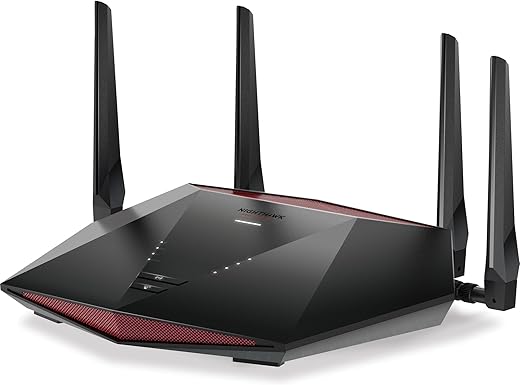
- Robust external antenna, 3 external strong antenna enhances signal transmission;High power design in pursuit of ultimate capability
- Gigabit ethernet data transfer 10 times faster than 10/100 fast ethernet devices
- Operating System: Asuswrt
,
Specification: ASUS RT-AC53 AC750 Dual Band WiFi Router (Black) with high Power Design, VPN Server and time scheduling, Dual_Band (750 megabits_per_Second)
|
5 reviews for ASUS RT-AC53 AC750 Dual Band WiFi Router (Black) with high Power Design, VPN Server and time scheduling, Dual_Band (750 megabits_per_Second)
Show all
Most Helpful
Highest Rating
Lowest Rating
Add a review
Related Products




ASUS RT-AC53 AC750 Dual Band WiFi Router (Black) with high Power Design, VPN Server and time scheduling, Dual_Band (750 megabits_per_Second)
₹3,599.00

Shopping King Louis XIV –
Before i bought this product i did lot of research on deciding which manufacturer to choose from, but finally I decided to go with this one as it somehow matched all of my requirements.
So as long as it fulfills these following requirements, you should be good to go.
1. Area of coverage is within 1000-1500 sq ft. Although, you should be able to connect to this router even further if there is a single wall restriction. * Not sure if you can connect to this router from terrace or if you can from another floor as i haven’t tested that out.
2. Number of connected devices is around 4-5, although it supports more than that.
3. You don’t plan to use the usb port, even though it is available.
4. Your connection speed is between 300 – 433 Mbps (Mega bits).
5. Get latest firmware updates.
Also, to my surprise ASUS still provides updates for this model, even though it is more than 4 years old. There is a little bit of learning curve in setting up the router but once you get the hang of it you should be good. There are videos to help you out in youtube to guide you through this process. Although, it may not match your model, the user interface and process should be more or less than be the same.
The router does offer other features such QoS, VPN, Port forwarding etc., even though it might not interest you but it is there when you want to use it.
It supports both 5ghz and 2.4ghz bandwidth, but keep in mind when you want to connect to 5ghz the devices must be within a closer range to the router and also there shouldn’t be lot of restrictions between the device and the router. In that case, you can go with 2.4ghz bandwidth and it will work just as fine. This is not a defect, but it is how it works. The attenuation for 5ghz is far greater as it requires more energy to pass through restrictions when compared to 2.4ghz. This is a downside of using 5ghz in any router, although it does offer little bit of greater speed when compared to 2.4ghz.
The router does not come with the latest firmware, so make sure you update it as it is contains lot of vulnerability fixes with the latest update. After you setup your router, there is an option within the interface which will check for latest firmware update and if there is a new version available then you can download it right from asus router user interface. The other option is to go to asus website and get the update from there.
I know i’m not taking not full advantage of the feature set it provides, but at the end of the day it does what it supposed to do. So if you can find a router that does the same with a cheaper option it is well and good other wise look no further.
Milan das –
Signal quality is very good coverage is also good connection is secure quality is awesome easy to use with asus router app to configure this router
SACHIN –
The signal is pretty neat ranged ,stable and reliable with great ping for latency headed tasks .
2.4 GHz –
Pros :
1. Great Range
2.Maximum speed
3.Maximum devices can be managed = 7-8
Cons :
1. More devices could be linked .
5.0 GHz –
Pros :
1.Maximum Bandwidth
2.Highest speed available from broadband.
3.Maximum devices = 5-6
Cons :
1.Range is too short ,around 7-8 metre
2. Maximum devices can be improved .
On a more superficial note ,
The router is very good for its cost to feature and performance value,
Have no other option if your budget is tight ,
Go for Asus.
CMAfsal –
I was looking for replacement for TPLINK WHR740N which I was using as repeater but did not support 5GHz. Was about to buy another TPLINK then came across this. In a moment indiscretion, based on the PC mag review without checking further I order this. That was a big mistake.
-Was able to set up as repeater for 2.4GHz easily. Router did not detect 5GHz AP
– I had to change the band of 5GHz to get it detected. Couldn’t find an option to setup band in repeater mode.
– After changing the band, 5GHz SSID was seen, but repeater mode did not work.
– Upgraded firmware to 3.0.0.4.380_10760. Only then then I could set it up as 5GHz repeater.
– I could not set up repeater for both 5GHz and 2.4 GHz simultaneously. Could not even use same SSID for repeater.
– Eventually settled to set up repeater for 5GHz as one 2.4 GHz and 5GHz with different SSIDs.
– I wanted to return the item. However only replacement was possible no return. So decided to stick with it and check stability.
– Multiples times I experienced a situation where router was connected to AP. I was able to connect to router too but was unable to connect to internet even though I was able to connect to internet from main AP.
– In the repeater mode, I could not get the router to connect internet(e.g. firmware upgrade).
– Decided to go for a replacement. Replacement came today and I have set it up. I had to update firmware again to get it work as repeater with 5Gz.
– I am not very hopeful all issues are resolved as other users have also reported similar issue.
Conclusion
* No issues with Router of AP mode. Very simple set up. Hence the 3 rating.
* If you are looking for router that you want to directly connect to main router using cable, you can may go for this.
* I could not find OpenWRT or DD-WRT firmware for the model. If you have any such plans buy some other router.
Amazon Customer –
Easy to setup. Only thing to remember is to input the MAC address from your previous router or your ISP. It will work only after this step. This step is not mentioned in any manual or YouTube video. Range is good but not exceptional. Control of connected family devices is easy and precise.