


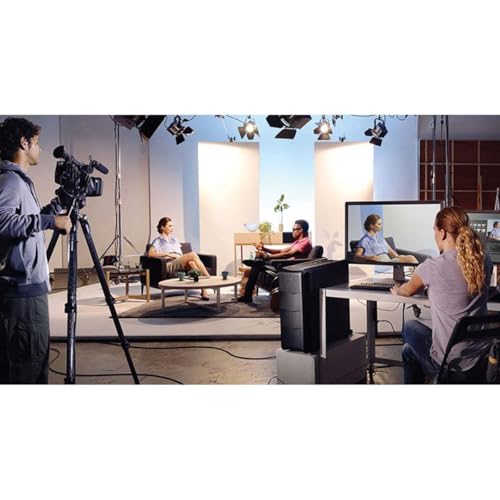
Blackmagic Design Intensity Pro 4K Capture Playback Input Output Card Ultra HD at 30fps and 1080p at 60fps
₹37,000.00
- HDMI Video Input: HDMI type A connector
- HDMI Video Output: HDMI type A connector
- HDMI Audio Input: 8 channels embedded in SD, HD and Ultra HD
- HDMI Audio Output: 8 channels embedded in SD, HD and Ultra HD
,
Specification: Blackmagic Design Intensity Pro 4K Capture Playback Input Output Card Ultra HD at 30fps and 1080p at 60fps
|
13 reviews for Blackmagic Design Intensity Pro 4K Capture Playback Input Output Card Ultra HD at 30fps and 1080p at 60fps
Show all
Most Helpful
Highest Rating
Lowest Rating
Add a review
Related Products



Blackmagic Design Intensity Pro 4K Capture Playback Input Output Card Ultra HD at 30fps and 1080p at 60fps
₹37,000.00

Juan Fco –
Para profesionales. Una maravilla.
Abraham –
Not working properly. Totally waste of money. I am not expected. This like.
Very much worried about this product.
Don’t buy. Try to another way.
Kunjan Sinha –
good
Placeholder –
Excellent one for channel running purpose
Frisco –
Update: I thought this was working great, but actually every once in a while the capture inserts a single black frame with OBS 26.1, causing a glitch in the video I am producing. I don’t get the problem with the MediaExpress application from Blackmagic, so this could just be an OBS bug. Nonetheless, I’m back to using my AV.IO 4k until the problem is fixed. So beware this might not be ideal for use with OBS on linux right now.
I installed mediaexpress, decklink-sdk, and decklink from the arch linux AUR and ran “systemctl enable DesktopVideoHelper.service”. Then I shut down my machine and installed the card. After I rebooted, I clicked the “+” button under sources, selected “Blackmagic Device,” and then just selected the Intensity Pro 4K under the list of devices. I’m so glad I got this card after spending so much time messing with USB capture devices. Even when a USB capture device may work fine on its own, USB 3.0 itself is really finicky and I had to try out a bunch of different USB/PCIe interfaces before finding one that worked. As a bonus, my camera (a Sony alpha A6100) outputs 4K 29.97p at 4:2:2, which this BlackMagic card can capture. By contrast the best USB capture device I tried (the Epiphan 4K AV.IO 4K, which is more than twice as expensive as the BlackMagic card) can only do 4:2:0 at that resolution–you’d need at least USB 3.1 Gen 2 to do any better.
Another difference between this card and a USB device is that the video input does not show up as a V4L2 device. For me, this is a bonus, because I always want to use the output of OBS as a virtual webcam (via obs-v4l2sink), and never want google meet, zoom, jitsi, etc., touching my raw camera inp;ut. Chromium in particular tends to get stuck in a mode where it wants to open my real camera instead of the v4l2loopback “virtual” webcam, which has forced me to jump through hoops to hide my real web camera from chromium while still using it in OBS. With the BlackMagic card, the problem goes away because chromium has no idea about the BlackMagic card, so the virtual webcam is the only option it can open. That said, if you did want to use your camera’s HDMI output as a normal webcam or possibly use it with other applications, then a USB capture device might be better. For example, you’ll need to recompile ffmpeg if you want to take input from the Intensity Pro 4K (though there seems to be an ffmpeg-decklink package in AUR that probably makes this easier).
One negative is that the card does not label inputs and outputs. The HDMI input is the bottom port (furthest from the D connector), so that’s where you want to plug in your camera.
Another negative is that you do have to rely on a dkms kernel driver, so in theory the kernel could change some interface and the driver would stop working. The AUR package for decklink does require two tiny little patches, and the package maintainer no longer has a BlackMagic card, so there’s some risk there. I think worst case you’d have to downgrade to the lts kernel temporarily until blackmagic updates their driver or someone steps up to fix the package.
So all in all, I hesitated a lot before getting this, because I thought that USB capture devices would be a safer bet. In the end, though, I’m super happy with the purchase and only wish I’d purchased this sooner–particularly before buying my AV.IO 4K (which is a also good device, just very expensive and not quite as good as the Intensity Pro 4K).
Amazon Customer –
Intensity Pro is the integral part of our workflow in live broadcasting lately. I have tested it, works fine as expected. Blackmagic design never let me down
Yves –
Cette carte fonctionne très bien pour la numérisation de VHS, Hi-8, Video8… Avec la meilleure qualité possible.
Trois défauts, son prix qui est plutôt cher, sa rareté qui fait qu’on en trouve pas partout (même sur Amazon suivant la période elle n’est pas disponible) et dernier point négatif, il y a assez rarement, mais il faut quand même le préciser, des “lags” qui font que lors de la numérisation l’image reste fixe pendant 1 voir 2 secondes. C’est rare et ça n’arrive environ qu’une ou deux fois sur un enregistrement de 1h30.
Bref, bonne carte, la seule qui permet encore de numériser de l’analogique et cela en bonne qualité. Je recommande.
Mohamed Haris –
Card received working fine thank you very much for quick response.
Borislava Tatchev –
Una soluzione davvero eccezionale e in un universo superiore rispetto ogni scheda di elgato.
Questa scheda è un video i/o device e si integra completamente con Blackmagic DaVinci Resolve Studio per il color grading e instant reply.
In OBS offre una quantità senza precedenti con real color science. Supporta la registrazione video in numerosissimi codec professionali. Può acquisire video da vecchie tecnologie video.
Stra consigliata per gli usi specifici.
Può acquisire e riprodurre in contemporanea su applicazioni diverse.
Richiede il SW e il driver da Blackmagic.
Non è per gaming è una scheda professionale.
Sourav Mondal –
Vary good
Trapti B. –
Its a good upgrade to non 4K version. But only problem is that it has humongous file size output with Media express. And the BMP pro software does not provide low res codecs.
Its picture quality is amazing. It works well with OBS
たかワン –
開封後の箱入りで 届きました。
中身のカード本体は 新品同様で、ドライバーソフトのSDカードはありませんでしたが、Blackmagic Design サイトより 最新ドライバーをインストールして、Win11のPC,Grass Valley EDIUS9 で動作確認しております。
Amazon Customerdf –
Good