



Brother DCP-L2531DW Multi-Function Monochrome Laser Printer with Auto-Duplex Printing & Wi-Fi
₹2,899.00
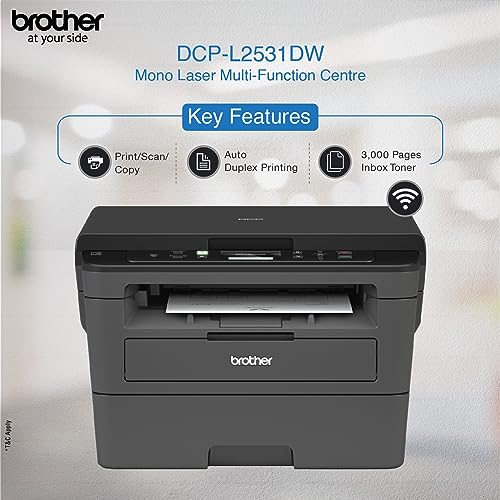
- Printer Type – Laser ; Functionality – All In One (Print, Scan, Copy); Printer Output – Mono
- Pages Per Minute – 30 ppm
- Page Size Supported – A4, Letter, A5, A5(Long Edge), A6, Executive, Legal, Folio, Mexico Legal, India Legal ; Duplex Print – Auto; LCD Display
- Compatible Laser Toners – TN-2465 (3000 pages), TN-2469 (4500 pages) : as per ISO standards
- Compatible OS – Windows XP Home, Windows XP Professional, Windows XP Professional x64 Edition, Windows Vista, , Windows 7, Windows 8, Windows 8.1, Windows Server2003, Windows Server2003 x64 Edition, Windows Server2008, Windows Server2008 R2, Windows Server2012, Windows Server2012 R2, Mac OS X v10.7.5 / OS X v10.8.x / OS X v10.9.x ; Ideal Usage – Small Office Home Office ; Duty Cycle – 15,000 pages a month
,
Specification: Brother DCP-L2531DW Multi-Function Monochrome Laser Printer with Auto-Duplex Printing & Wi-Fi
|
8 reviews for Brother DCP-L2531DW Multi-Function Monochrome Laser Printer with Auto-Duplex Printing & Wi-Fi
Show all
Most Helpful
Highest Rating
Lowest Rating
Add a review
Related Products


Brother DCP-L2531DW Multi-Function Monochrome Laser Printer with Auto-Duplex Printing & Wi-Fi
₹2,899.00

S N –
I’ve been using this (for home purpose but involves a lot of printing) for the last 3 months and it’s working very well. Smooth functioning, no problems at all. Very easy to use even for a person like me who’s not an expert. I am able to use all the features they’ve mentioned in the ad. I found wifi feature very convenient and easy especially when you can take printout from your phone as well. It makes otherwise tiresome job easier. Duplex printing is the best feature for me as i need to take a lot of print. It saves money and time. So I would definitely recommend this printer which proves valuable for money. Print quality is also very good.
I would like to add that after more than a year, I am giving the same rating & review for this. Printer is functioning very well.
AK –
Have been using this for about 2 months now.
I use a bunch of Linux machines at home (Ubuntu, Fedora).
It was a pain to configure things on the Linux computers. Automatic printer detection via Wi-Fi doesn’t work well, of even if it detects it doesn’t print. Hence had to set a static IP for the printer and do manual configurations on the Linux computers. However, once that was done, printing works reasonably well.
Non-technical users would have a hard time figuring things out themselves (but then again, I suspect non-technical users are unlikely to be using Linux computers). Don’t know how easy/hard it is on Windows or Mac.
Printing works seamlessly on Android and Apple iOS smartphones without any pre-configuration.
Scanning sometimes fail on Linux computers, and always fails on Android, even with Brother’s official app. Didn’t try scanning on iOS. (Personally for me scanning isn’t a frequent use-case.)
Print quality is good. Automatic-duplex printing is convenient.
Overall I’m satisfied, but I wish it was easier to set up.
(Didn’t try duplex copying).
anant ranjan –
Worst printer
It does not support refilling cartridge.
All time we have change toner. Which is very costly.
Always shows Replace Toner message.
Don’t buy this printer.
Chandramauli D. –
I have been using it for months now , it is running like a 🐎. Everything 😍
Virendra Bhati –
Worth a buy
Bizfac Infotech –
The Brother printer is in use in our office and the performance so far has been excellent. Unlike other printers which have small issues like paper jam is not encountered in this printer until now. The software to Scan and wireless connectivity is seamless.
Alcatraz –
Very happy with the printer. Low maintenance. And connecting to Wifi is easy, and very convenient.
Just another customer –
Packing and contents:
Printer came very well packed in the original Brother box along with toner, CD and USB/power cables.
Set-up:
Installing the printer was a breeze. It supports both USB-based and wifi printing. I just had to install the appropriate drivers first, and then followed the on-screen instructions. Wifi set-up was straight-forward: the only painful part was entering my wifi password character by character on the printer but this is a one-time thing!
Features:
This printer comes with several impressive features. The highlights include automatic back to back printing (duplex printing in B&W), copying function (B&W), scanning function (B&W and color) and most importantly, an advanced 2-in-1 ID card copying function (where you can print two sides of an ID card on the same page). It supports wifi printing too. I am yet to install the brother app on my phone, but direct printing from phone (without the app) is very easy as long as the phone is connected to the same wifi IP as your router. The printer has a wonderful interface and allows you to change the density/contrast and several other settings for the copying function.
Overall verdict:
At this price range, this is the best monochrome laser jet printer with several advanced features.