

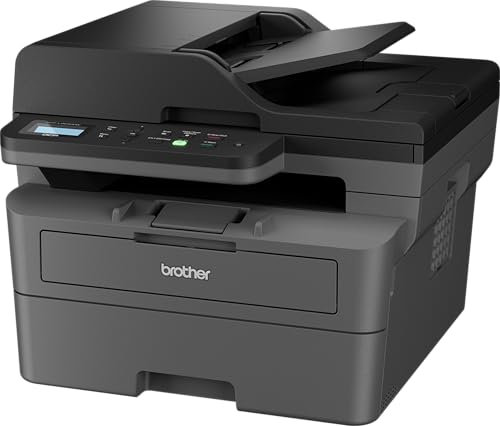

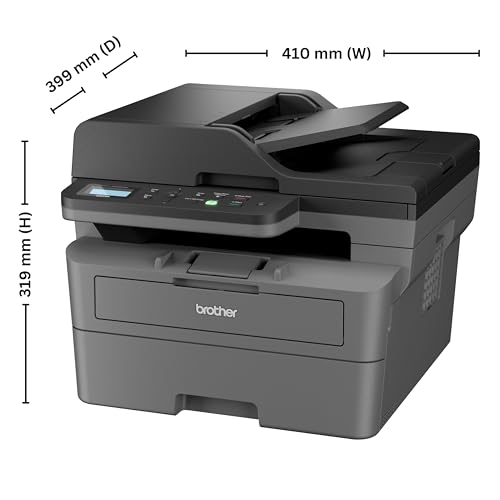

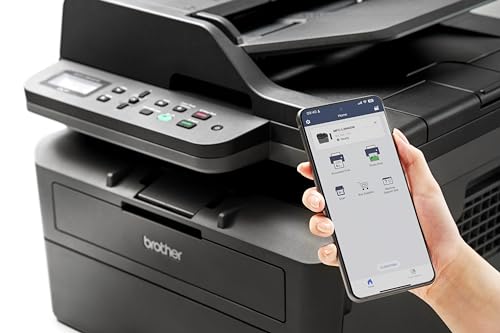
Brother DCP-L2640DW 2 in 1 (ID) Copy Button Auto Duplex Laser Printer, 34 PPM, Print Scan Copy, LCD Display, ADF, 256 MB Memory, (WiFi WiFi Direct…
₹24,249.00
- Printer Type : Laser Printer ; Functionality : Print, Scan, Copy ; Print Output : Monochrome ; Connectivity – Hi-SpeedUSB2.0, Ethernet 10Base-T/100Base-TX, IEEE 802.11a/b/g/n (Infrastructure Mode), IEEE 802.11a/g/n (Wi-Fi Direct) ; Scanner Type – Flatbed & Automatic Document Feeder
- OS Compatibility -Windows, Mac & Linux ; Mobile Compatibility – Android & IOS ; Hardware Interface:USB & Ethernet ; Enlarge/reduce option: Yes ; Auto double print: Yes
- Maximum Print Speed (color): NA, Maximum Print Speed (Monochrome): 34 ppm, Maximum Print Resolution (Color): NA | Maximum Print Resolution (Monochrome): Upto 1200 x 1200 dpi
- Paper Size : A4, Letter, B5 (JIS), B5 (ISO), A5, A5 (Long Edge), B6 (JIS), A6, Executive, Legal, Mexico Legal, India Legal, Folio, 16K (195×270 mm), A4 Short (270mm Paper),COM-10, DL, C5, Monarch (Legal and Folio size paper are supported only in some countries.) ; Max paper thickness (in GSM) – 163 GSM ; [Maximum Input Sheet Capacity] – 250 Sheets ; Compatible Ink/Toner : TN-2570XL Toner Cartridge ; Additional Printer Function – Print, Scan and Copy ; Power wattage of printer : 470 W
- Special Features : 2 Sided Printing, ADF-50 Sheets ; Ideal Usage [Recommended Uses of Product] : Home & Small Office ; Included Components : Power Cable, USB Cable, Installation CD, Inbox Toner TN-2570XL (3000 pages) (needs to be installed)
,
Specification: Brother DCP-L2640DW 2 in 1 (ID) Copy Button Auto Duplex Laser Printer, 34 PPM, Print Scan Copy, LCD Display, ADF, 256 MB Memory, (WiFi WiFi Direct…
|
9 reviews for Brother DCP-L2640DW 2 in 1 (ID) Copy Button Auto Duplex Laser Printer, 34 PPM, Print Scan Copy, LCD Display, ADF, 256 MB Memory, (WiFi WiFi Direct…
Show all
Most Helpful
Highest Rating
Lowest Rating
Add a review
Related Products


Brother DCP-L2640DW 2 in 1 (ID) Copy Button Auto Duplex Laser Printer, 34 PPM, Print Scan Copy, LCD Display, ADF, 256 MB Memory, (WiFi WiFi Direct…
₹24,249.00

Raunak Dey –
Good
Tak sing Lam –
I got the printer this morning. I was quite excited, only to discover the printer has hair pulling issues. Under twelve hours of using the printer I faced two major issues.
1) The printer goes into Deep Sleep mode. This mode is equivalent to the machine turned off, the power button has to be pressed to start the printer and get out of Sleep. I had to go on Reddit and YouTube to find a solution, took me around an hour.
2) Scanning seven one sided A4 color pages gets the error “Memory Full – Cannot continue”. If I had scanned 50 pages its understandable memory is full, scanning seven pages and getting this error is unacceptable.
3) There is a black grayish background while scanning an identification card or passport. As per the research I did a specific application has to be downloaded to tweak the settings.
EDIT:
Issue number four:
4) Only two pages scanned out of a 4 page document.
I don’t know if I received a defective item or not.
jp –
Delivery is fast. Setup is easy not complicated.
Advocate Amit Kumar Srivastava –
Brother 7640dw
1) Is like xerox machine.
2) print resolutions 1200*1200 or
You can set to 600*600 or 300*300
Normally all printers 600*600
3) very fast and sharp printing.
4) A4 auto duplex both side printing A4
only.
5) Legal printing duplex manually as other lrinters.
6) Toner B021 capaciy of 80 grm powder.
HP 12A toner 100_120 grams powder.
7) Tone easily refillable after Market and at Home also. See YouTube videos.
8) paper tray adjustable for A4 and Legal
9) LAN is also useful.
10) WIFI AND WIFI DIRECT
First WiFi and WiFi direct is different
WiFi direct means no need of app directly connected with WiFi and print.
11) Cartridge and Toner and seperate in brother that’s good.
12) For low maintenance refill toner immediately when goes fainting.
13) ADF auto document feeder means set of 50 pages can be scanned or printed automatically. Note ADF scanning don’t have Duplex scanning.
14) This model is top end model in this category
15) Price range 20,000_21000
Raunak Dey –
I have used this particular printer or some variant back in US too. Lasts long. Easy to print a lot of pages both side.
My favorite part is the auto document feeder for scanning purposes. No need to sit and use the flat bed.
Supports wifi. Tho I mostly just use the usb connection.
As for deep sleep thing. It’s the default setup (you can set it to be something else. I think the max is 90 mins?) . When you print something it will come out of deep sleep on its own. Am referring to the comment below which talks about deep sleep.
satyam kumar –
“cannot communicate with printer” – I have tired all the usual, rebooting, reconnecting to network. Brother UAE refused to help – you have to call Brother USA. Why doesn’t this work straight out of the box?
I used to like Brother printers – this is an exercise in frustration
update – I spoke to brother usa – I had to reset the network card, how is anyone supposed to know this??!!
LATEST UPDATE – now when it goes to sleep it won’t print – I have to unplug it for 5 minutes, then sometimes it works. terrible.
Piyush Shrivastava –
Best performance
Muneer Baloch –
Like – maybe something new and different a little.
Dislike – the Green light
I mainly use this printer for office works.
Concerned Citizen –
As a lawyer, I needed a printer that could handle double-sided printing and scan pages quickly—and this one did not disappoint.
It prints at high speed, and black-and-white scans are processed swiftly (though color scans take a bit longer). The only drawback is that it doesn’t support automatic duplex scanning. Additionally, it lacks a color printing option.
However, if you’re looking for a fast, reliable printer and scanner for professional use, this is an excellent choice.