
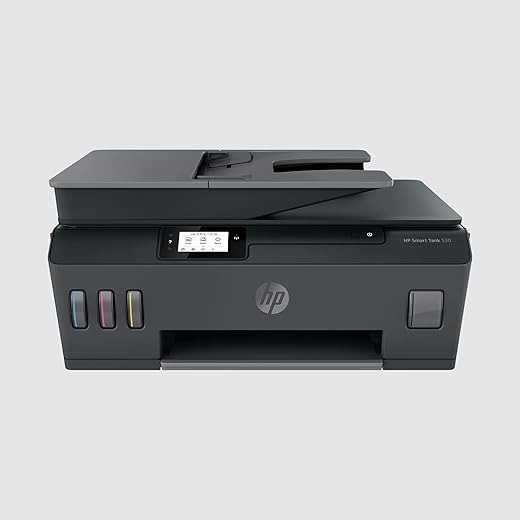


HP Smart Tank 530 All-in-one WiFi Colour Printer with ADF (Upto 18000 Black and 8000 Colour Pages Included in The Box). – Print, Scan & Copy for…
₹16,999.00
- 【All-in-One printer】Streamline your workflow with this all-in-one – print, copy, scan HP Smart Tank printer that elevates your projects with stunning color prints and dependable flatbed scanning.
- 【Quality prints】The included HP GT53XL 135-ml Black Original Ink Bottle and HP GT52 Cyan/Magenta/Yellow Original Ink Bottle ensure that your photos and documents always stand out.
- 【Warranty and support】Get 1-year or 30,000-page limited hardware warranty and print with ultimate peace of mind. Reach out to our 12×7 voice support or 24×7 chat support for quick assistance.
- 【Fast printing】Maximize your productivity with remarkable printing speeds up to 11 ppm (black) and 5 ppm (color) and stay ahead of your workload with 35-sheet automatic document feeder.
- 【Input and output】Say goodbye to limitations by tackling your printing tasks with A4, B5, A6, and DL envelope standard media size compatibility, up to 100-sheet input and 30-sheet output capacity
- 【Easy-to-use interface】Simplify jobs and save your time with a 2.2-inch touchscreen MGD (mono graphics), power button, and touch button (Home, Help, Back).
- 【Compatible OS】Be more productive and print with any device, whether at your office space or home, with Windows 11/10/7 and macOS 10.11/10.12/10.13/10.14 compatibility.
- 【1000-page duty cycle】Enjoy consistency in printing with a 1000-page duty cycle, which allows you to complete your tasks more efficiently, making it ideal for entrepreneurs and families.
,
Specification: HP Smart Tank 530 All-in-one WiFi Colour Printer with ADF (Upto 18000 Black and 8000 Colour Pages Included in The Box). – Print, Scan & Copy for…
|
7 reviews for HP Smart Tank 530 All-in-one WiFi Colour Printer with ADF (Upto 18000 Black and 8000 Colour Pages Included in The Box). – Print, Scan & Copy for…
Show all
Most Helpful
Highest Rating
Lowest Rating
Add a review
Related Products




HP Smart Tank 530 All-in-one WiFi Colour Printer with ADF (Upto 18000 Black and 8000 Colour Pages Included in The Box). – Print, Scan & Copy for…
₹16,999.00

Poonam –
The product looks very expensive in 1st look but the plastic quality is very bad even my 10k Epson printer had a good plastic quality, printing speed is very slow it’s easy to set-up , printing quality is good i won’t say excellent cuz my Epson printer had the same quality of printing , just over priced product think before buying.
Placeholder –
The media could not be loaded.
@SP
2023
Longest review ever,most detailed review ever with practical knowledge, trials and errors.
Pros
Watch youtube for unboxing, installation guide.
In LCD you can have many features to see and adjust, any types of notification comes,like printing, cancelling, successfully connected to mobile device or pc.
If possible buy printer having big LCD display to see printer status otherwise you have to remember LED button blinking pattern for each error code.
Windows
Install driver from internet
Go to Google search
Types hp 530 printer driver
If windows 10,11
Extra HP smart app from microsoft store.
I tested on windows 7 and windows 11
Both works
Connect with USB.
Connect with WiFi through router.
Connect with WiFi direct to printer. (manual or automatic methods password 12345678)
Works with android, windows pc, laptop
In android, install HP smart, HP print service plugin. Extra mopria print, samsung plugin from Google play store
ADF Automatic Document Feeder for scanning, copying multiple pages at once.
Cons
LCD display touchscreen response is slow like initial days of android smartphones.
By mistake wrong input/tap/click may occur.
No custom page input only specific page dimensions from the list. For photoshop, corel draw users like sovenior page print size not possible without hassle.
Possible with hassle.
Example
8x10in available but 7.5x10in not available so manually adjust the content, shift little bit left side in corel draw or photoshop.
C5 envelope available
But custom envelope not possible
So manually adjust the content position
So, some testing pages for experiment trial and error will need before actual print page.
HP extra warranty not applicable with HP 530,
Ink level shows full in software when half is filled, same problem for all 4 colors.so see the physical semi transparent label ink tanks on the printer front side by torch light.
Same quality like deskjet, inkjet printers
Not same quality as digital printers, xerox colour offset or 4 color room size offset.
Though tested with normal A4 paper
Not tested with photo paper.
But tested with art glossy paper,
quality is good with glossy paper 130gsm compared with Matte normal A4 75gsm paper
Printing Resolution is 1200x1200dpi
Not 4800x1200dpi in some epson, canon printers
Borderless printing possible with hp photo paper option selection in printer dialog box but not possible with plain paper selection.
Matte A4 75 GSM paper –
Best, normal, draft
All have Good quality in sharpness.
Colour depth less depends upon quality selection.
Scenario 1
Art Glossy paper –
Hp photo paper option
Best quality option
Printing Output is not good, smudges if you have text, line on background color.
Normal not tested
Draft not tested
Scenario 2
Art glossy paper –
Plain paper option
Normal quality option
Best Output Sharp text, lines on background colour.
Best not tested
Draft not tested
Check review in youtube. Lots of videos are there. Type hp 530 printer review or unboxing, or installation.
Speed
Tested
test page print or text based black and white print time within 3 to 4 secs
Corel draw, photoshop
full color image print took
Quality
Draft 10 secs approx
Normal 40 sec approx
Best 1min approx
Update 1, 2023
Problem
On Art glossy paper
Printed visiting card on letter size paper
The maximum size possible after A4 size in this printer,
The black text is smudging like 10% on white portion of the paper if fingers are pressed and dragged. Problem with the black ink only, not on colour inks.
In hp site 530 model inks are
Colour is pigment ink
Black is dye ink
But
In other resources in websites, youtube
It says the opposite.
Black is pigment ink
Colour is dye ink
As 100 % hp original black ink on glossy paper smudges, smears so in corel or photoshop give CMYK as deeper blue color so that ink will not come out even after few days drying. CMYK Value should be approximately
CMYK (Cyan Magenta Yellow Black)
C 80 %
M 80 %
Y 0%
K 50%
Don’t know about substitute ink, compatible ink. From needle, GPS, ANG, proffisy, etc.
I have purchased proffisy gt51 black with gt52 colour cmy ink,
but gt53 black or gt53xl black as substitute ink not available in the online stores other than original, so don’t know are gt51 and gt53 black inks are same or not, whether it will work in the hp 530 black cartridge or not.
That’s why purchased print head cleaner solution for removing ink clog with ink suction tool. Available in Amazon and Flipkart, check reviews, or how to use in youtube.
I will test new black gt51 after full used of original ink in the inktank.
To get max DPI print
Goto print option
Where you can set paper size
There only little downward we can see
Max dpi option make it No to Yes,
But print duration will be above 5mins approx per page, without max dpi enabled means No option, will take within 10 to 20 secs depends upon content and print quality option choosen.
Update 2, 2023
Con
Even quiet mode is on mode,
Quiet mode temporary disabled will be displayed For A5 papers, but
For A4, letter papers quiet mode is possible.
Quiet mode means less sound in printing, slow printing, no or less damage of papers while the printer takes the paper inside by rollers, if the roller takes the paper more speed then there is a high chances of tearing the paper specially for less GSM like 70,75 GSM paper type.
Update trick
In order to get quiet mode on mode in A5 or any small width, you can fool the printer by giving paper to block the paper tray infrared sensor the right most one (photo uploaded/given in my photos review section), and in printer setting set as A4 or letter. Then quiet mode is enabled even after giving A5 or 1/8 of demy paper size (commercial printing paper size) in the tray. So no or less damage of papers, paper jams, etc.
Remember even in A4, letter with draft mode, quite mode not possible.
In normal, best, quite mode is possible.
For paper jam you have to remain open the top position of the printer by T10, T9 screwdrivers like from taparia company example.
You have to use long bit in height not short height bit.I think it also called security screw. You cannot use normal minus screwdriver or 4 or 5 star/corner like bit screwdriver. Watch some youtube video for this.
A light is required inside the printer to see the paper when there is a paper jam
So use a USB LED with USB A male female extention wire or cord of approx 1.5 m long.power it from cpu or laptop or adapter or powerbank…..
Placeholder –
Excellent product with loaded features for home and small business.
Vedant Nayak –
When I say smart, it not only connects with a smart app, it also has a smart display that can not only guide you with the initial installation process, it has a functional aspect to it that allows user to control scan, print and settings functions through the menu available in the screen. Installation was fairly easy. Took me maximum 15 minutes including test print and scan. You can easily connect to your WiFi using the menu on the touch screen and input your password. You can also connect to the printer via Bluetooth using mobile app on phone or on laptop. Printing speed is decent, pretty average for inkjet printers. Nothing too fast.
Treksense Technologies Private Limited –
I received brand new seal packed product. Initially while setup, I added ink and then when I have to install cartridges and print the alignment page, then i saw the holder where we have to fit the cartridges it was hitting the printer left and right very hard and not stopping in the middle. I called HP support and they tried to solve the issue over phone with sew trouble shooting steps. However result was same. HP arranged the service call for me and I also talked to amazon support for the issue. I explained them that I got faulty product which I can to know after inserted the ink so I was hesitated to return the product as this might be given to someone else. But Amazon says, this is not my (ME) issue and will be taken care by Amazon even product is opened and they arranged the return and refund as same product was not available anymore with them.
5 star for AMAZON.
Both HP and Amazon was scheduled for next day. Luckily HP guy came firs and fixed the issue in 2 minute by unscrewing 4 screw and placed the transparent encoded strip in position (sensor behind cartage holder). He said this might happened in transport. Once it worked, i canceled the return request.
5 star for HP support.
Printer:
Black ink is pigment and hence once printed on paper it is waterproof even if you put the printed paper in the bucket full of water.
Color is not waterproof, however they don’t fade easily.
ADF: This is the plus advantage in this printer over HP 515. Just keep the bundle of paper in ADF and get the scanned or copy without any mess.
INK: I got 3 color (GT 52 70 ml), Magenta, Cyan, Yellow each and 3 black (GT 52 XL 135 ml) you will get only 1 black in HP 515 which is 2000 cheaper
Overall printer is good.
5 star for Printer.
Ravi Kumar Indukuri –
Worst Printer, Dead Slow in Printing black and white and color
M. ADEEL AIZAZ –
After a lot of research & comparisons I finally end up buying this awesome printer for our business. The ADF function is very helpful in scanning & printing bunch of papers without having to put and remove each sheet after scanning or copying is done as it is done in flatbed printers/scanners. The wifi & “e-mail to printer” functions are no doubt very convenient for the user for remote printing jobs. Also with ample inbuilt memory of the printer there is no fear of the print jobs being stuck or printer hanged in between. My opinion, value for money printer, must go for it.