
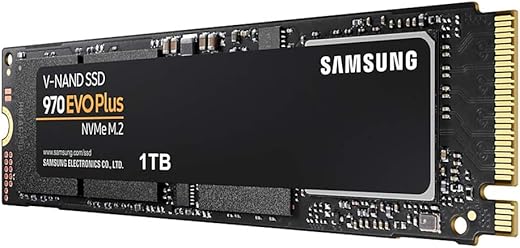


Samsung 970 EVO Plus 1TB PCIe NVMe M.2 (2280) Internal Solid State Drive (SSD) (MZ-V7S1T0)
₹7,900.00

- Sequential Read up to 3,500 and Write speeds up to 3,300 MB/s respectively. Performance varies based on system hardware and configuration
- SSD Capacity: 1TB, Cache: Samsung 1GB Low Power DDR4 SDRAM.Voltage : 3.3 V ± 5 % Allowable voltage
- Interface : NVMe (PCIe Gen 3.0 x 4)
- Form Factor : M.2 (2280)
- Check out the SSD bying guide by Amazon in Videos Section
- Designed for tech enthusiasts, hardcore gamers, and professionals who need unrivaled performance
- Advanced Drive Management through Samsung Magician Software to help you manage the drive. A user friendly tools help keep your drive up to date, monitor drive health and speed, and even boost performance.
- Warranty : 5 year limited. Contact :1800 30 7267864
,
Specification: Samsung 970 EVO Plus 1TB PCIe NVMe M.2 (2280) Internal Solid State Drive (SSD) (MZ-V7S1T0)
|
10 reviews for Samsung 970 EVO Plus 1TB PCIe NVMe M.2 (2280) Internal Solid State Drive (SSD) (MZ-V7S1T0)
Show all
Most Helpful
Highest Rating
Lowest Rating
Add a review
Related Products


Samsung 970 EVO Plus 1TB PCIe NVMe M.2 (2280) Internal Solid State Drive (SSD) (MZ-V7S1T0)
₹7,900.00

Shail016 –
excelente producto, llevo tiempo usandolo y no tengo problemas
Placeholder –
The SSD is as advertised, I am getting good read and write speeds. In real world it translates into very low startup/shutdown time and app opening is lighting quick (compared to my 7200rpm HDD)
Since its a 500GB version the sustained R/W speeds will not be that much(again thats not a frequent use case), which is again as per the specifications (and by no way bad). The higher capacity EVO PLUS has marginally more write speed, endurance and higher sustained R/W rate. So be very clear about what you want.
In general if you have enough budget always go for bigger capacity SSDs (1TB and higher if available), that gives you more R/W rate, more endurance and higher sustained R/W rates.
If you already have a WD black or ADATA xpg 8200 pro ssd you dont need to buy this. (Rather if you have any decent nvme SSD you dont need to buy a new one) put aside bench marks the real world difference in isolation will never be noticed that much.
what Benefits I observed. ( on MSI GE62 6QD, 16GB DDR4, intel i7)
1. Very low startup/shutdown time
2. Exceptionally low app opening time
3. Very Low power consumption (at idle it goes as low as 10W for 45W rated CPU)
4. Some 15 to 17 percent less Heating of the system
why I preferred samsung over WD and ADATA (why I spent 1K more on Samsung)
1. Marginally better R/W rate
2. Good past experience with Samsung SSDs (for same capacity they mostly have higher endurance)
3. ease of cloning with samsung data transfer sofware.
4. better ssd maintenance tool
SS –
Amazing!!!⭐️⭐️⭐️⭐️⭐️
louis bernal –
البائع weka موثوق فيه
Shail016 –
The original 128GB SSD on my 2017 MacBook Air was running out of space and was badly in need for an upgrade. I replaced it with this 1TB SSD and it gave the MacBook a new life. Note that an adapter is required to install a PCIE NVMe M2 SSD on old MacBooks. I used a Sensico M.2 NVME SSD Convert Adapter. Till now have not faced any issues with speed, battery life or heating. Planning to upgrade the storage of your 2017 MacBook Air? This could be a great choice.
Gerardo Vidales Villicaãa –
Isı değerleri 60-65 dereceyi bulunca pasif soğutucu taktım. 50-55 derece civarında düştü. Yeterli bulmayıp elimde bulunan minik fan ile etkin soğutma yaptım. (artık 45 dereceyi geçmiyor.) Daha önce Kingston marka kullanmış 2 yıl geçmeden sağlık %92’lere düşmüştü. (Şu ana kadar 30 TB yazılmış) 80-85 dereceleri gördüğüm zamanlar olmuştu. Isıya bağlı olarak bu kadar çabuk sağlık durumunun düştüğünü düşünerek bu üründe bir nevi tedbir aldım. Şimdilik 2.5 TB yazılmış ve sağlık durum %100.
Mannu –
Very great product.
The last image I attached is the test result of the HDD I previously used Toshiba MQ04ABF100 1TB 5400RPM. The first two are the test results of the two partitions of the SSD drive, just see the difference- 25X faster than the HDD. The price for the 250GB size is INR 5000, this product worth it. This SAMSUNG SSD 970 EVO Plus is the SSD with the best PCIe 3.0 performance.
But one thing, the warranty period for the 250GB variant is 5 years from the date of purchase or 250TBW which is earlier, and in this 1 week of purchase the Samsung Magician records 2.1 TBW, so in this rate the warranty period is just 2.5-3 years.
Now coming at the boot time, it takes 5 seconds to completely boot into WINDOWS 11 after power button pressed, restarting takes 8-9 seconds. Applications are running blazing-fast, just opens on click, in no time!!! I have observed, the installation of the SSD decreases the RAM consumption by almost 15%, this is an unexpected goodness of it.
5 stars for its performance on general computing, video editing and coding performance. I am not a gamer at all, so not sure of its gaming performance.
Dharmendrasinh –
Todo bien, de momento me ha funcionado sin problemas, en un mes compartiré mi sentir con el artículo
Placeholder –
I had been using this SSD from 2 years it has increased the speed of my computer 10 times. it works great. and don’t have any issue. I recommend you if you are looking for an gen 3 SSD go for it there is no batter option in market.
Mannu –
Samsung’s 970 Evo Plus M.2 NVMe SSDs are close to legendary performers at the sharp end of M.2 NVMe SSD performance charts. I was waiting for a long time to experience the performance of these drives first hand. The opportunity came when I purchased a new Dell G3 3500 (2020) Gaming Laptop with the following specs: i7-10750H, 1660Ti 6GB graphics, 16 GB RAM, 512 GB NVMe SSD, 15.6 inch 120Hz screen. The laptop by default has pretty decent specifications. But, when I was pushing through my workload, I could see it struggling.
The RAM was the first to get upgraded to 32 GB (Hyper X running at 2933 MHz @ 17-19-19). This gave a good jump in performance. However, the slower M.2 NVMe SSD (DRAM-less Kioxia) was creating a bottleneck which was becoming quite obvious. Additionally, I was getting tired of hauling a portable SSD drive connected to my laptop that had all my files and data on it. When I saw an special offer on Amazon for the 970 Evo Plus 1 TB, I had to get 2 of them.
Before installing the drives, I switched from the RAID to AHCI SATA mode on my laptop. [There are various resources online showing how to do this safely]. I installed the Samsung Magician software and Samsung NVMe drivers.
The drives are easy to install. In my case, I had to remove the original SSD and install the 970 EVO Plus in its place.
I used a cloning software (not the one Samsung provides) to clone my System drive to one of the 970. Then I booted up the system from the 970 after removing the old SSD. The boot time reduced from about 7-10 seconds (from the Dell logo to Windows login screen) to about 3-5 seconds. This was just a taster of things to come.
These drives are outrageously quick. Data transfers, load times of software and games, everything happens blazing fast. Seeing the performance numbers and charts is one thing, experiencing the fast performance first hand is another.
And then the drives rode away to glory……. Well, not quite. On just the third day after installing, one of the drives died. It wouldn’t allow my laptop to boot. It was painful to see it happen and I was looking at a big loss. Fortunately, I was able to return the drive and buy a new one for the same special price on the same day. That was just pure luck!
Now when the new drive arrived, I noticed something peculiar. Both drives which I had received the first time were made in Korea. But the drive I got the second time was made in China. I was in two minds – should I use it or return it? Checking the information on the box and verifying the serial number on Samsung’s website revealed that the product was indeed genuine. That was half a relief. Now I wanted to know if the drives performed the same or different.
This is what I have found by using the drives over a month. Both drives read and write performance is nearly identical (within margin of error). The “Normal” working temperature of the made in Korea drive is between 45 – 50 degree C; whereas the “Normal” working temperature of the made in China drive is between 38 – 42 C.
The other thing I noticed was that both drives hit the peak temperature mark during benchmark tests around the same time and the peak temperature was also the same – 85 degree C. But for some reason, the made in China drive came back quicker to a “Normal” temperature than the made in Korea drive.
Strange! It may also be that the made in Korea drive gets written to more often as it is my System Drive. But it’s not a convincing enough reason for me.
In short, the important thing is to make sure that the drive is genuine (by checking on Samsung’s website) than where it is made. Samsung does a stellar job on Quality Control in my opinion.
Update after more than 1 month of usage:
The drives were running longer in the higher range of “Normal” to “High” during normal usage. Even though my daily work does not involve heavy write activity to the drives, working on a remote server was causing a lot of writes to the drives. I decided to install copper heatsinks on the drives to try and keep the temperatures in the “Normal” range.
The results after installing the heatsink were astounding. (See photo). After this experience, I would recommend using a heatsink with these drives for anyone who intends to make full use of the capabilities of this drive.
Samsung chose to base it’s newer 980 Pro drives on the 970 Evo Plus than the 970 Pro. This should be proof enough for everyone about the potential of the 970 Evo Plus. Legend!